
Your suppliers and business partners often look you up online before they meet with you. It's how business is done today. The main source is LinkedIn. A bad LinkedIn profile will hurt your business. It will make you look less credible. I have a fix for this here that takes at most 20 minutes.
What happened recently is that after a career change, I updated my own LinkedIn profile. Did not think much about it until a week later, when I checked LinkedIn before a meeting with a bank official about some upcoming changes. It told me what sort of a guy he was and what he was in the bank. Then, almost immediately, I had a meeting with a retailer, and just before I talked, I automatically checked him up on LinkedIn too. That profile told me almost nothing. He did not look very credible.
"Retailers often underestimate how much trust is won or lost before the first call. A clear LinkedIn profile helps banks, suppliers, and local partners understand both the business and the person behind it.”
Ultimately, that contrast exposed a gap. So I checked some more and found many of my clients also had poor LinkedIn accounts, so I decided to make a tool to fix them.
Key Takeaways
- LinkedIn profile quality shapes first impressions before meetings, supplier calls, finance discussions, and store visits.
- Specific retail detail makes a business easier to trust than vague labels such as 'Owner' or 'Self-Employed.'
- Personal credibility helps readers understand the experience, systems knowledge, and operational skill behind the shop.
- Retail context explains what you sell, who you serve, and why your business is worth contacting.
- AI assistance improves wording best after accurate facts about the business are already in place.
- Twenty-minute updates are enough to improve a headline, About section, Experience section, and Skills list.
Core Definitions
- LinkedIn profile is a public professional summary that explains who you are, what your business does, and why someone should trust your business.
- Retail LinkedIn optimisation involves updating your headline, About section, Experience section, and Skills so readers can understand your business quickly.
- LinkedIn headline is the first short description most people see, so it should state your role, shop type, and product focus.
- Business credibility on LinkedIn involves specific facts about your store, your customers, and the experience behind the business.
- AI rewriting involves improving clarity after accurate facts about your products, location, role, and strengths are already in place.
What Is a LinkedIn Profile for a Shop Owner?
It is a professional page that explains the business and emphasises your role.
Why Does LinkedIn Matter for Independent Retailers?
LinkedIn matters for independent retailers because they deal with a complex network of stakeholders who verify credibility online. You also deal with suppliers, banks,
Consequently, a weak profile creates uncertainty and leaves the other person guessing what you actually do. A label such as 'Owner at Self-Employed' says almost nothing about the business, the products, or the experience behind it. For example, leaving your skills section blank deprives a prospective landlord of knowing your strong background in retail operations.
Conversely, a strong profile makes that easier. what sort of person you are, and what experience you bring to the table. Someone should be able to see in seconds what you are skilled at, what sort of operational, technical, or commercial experience you have. If LinkedIn shapes their thoughts about you before the first conversation.
How Can Shop Owners Improve a LinkedIn Profile in 20 Minutes?
Improving a LinkedIn profile in 20 minutes requires focusing only on the core sections that drive immediate credibility. Simply follow these six structured steps.
Step 1: Research other people's profiles similar to yours
What you are looking for are strong LinkedIn profiles from people like you. Pay attention to their headline, About section, Experience section, and the way they explain their business.
Step 2: Starting
If you don’t have a LinkedIn account, create one; if you have one, log into it.
Now check your existing email, phone number, and location are completely up to date. Verify that carefully. It will do you damage if these details are wrong.
Step 3: What Business Details Should You Add First?
Then, fill out your profile with the basics. Do not worry about perfect wording, spelling, grammar, etc., yet; get the facts down first so the profile accurately reflects what you did.
Make you your present position shows what the business you are in does, not just what you do in the business for example, not just I am responsible for buying, merchandising, customer service, supplier relationships, and day-to-day store operations in Johnson's Pet shop but add to this that Johnson's Pet shop which sells pet foods, toys.... in the Morrabbin area for over 30 years."
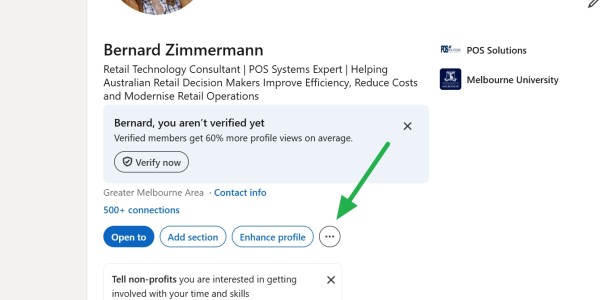
When you are happy with it, save it. Then print out your LinkedIn profile to PDF, see the green arrow below
Step 4: AI prompt
Now run the AI prompt below on that PDF. You can use any AI for this prompt. I tested it on ChatGPT, Grok and Claude.
|
Act as a world-class LinkedIn Strategist and Personal Branding Expert. Your task is to audit my current LinkedIn profile and then provide a fully optimised, high-conversion rewrite that maximises visibility, credibility, and conversion (job offers, follows, or sales). ## Step 1 – Clarifying Questions Do not proceed with the audit or rewrite until I answer. ## Step 2 – Audit & Gap Analysis Present the audit as a short, bulleted list of findings before the rewrite. ## Step 3 – Full Optimisation & Rewrite 1. **Headline** – Max 220 characters. Lead with a high-volume keyword, then a hook that speaks to my target audience and goal. |
It can turn rough facts into clearer, more professional wording without changing the real meaning, as business people want to read. Many of you will be surprised by how you sound after the prompt does its magic.
Now review it. One of the good points of AI is that you can ask it to add, change, or delete parts. A common change, in my experience, is dates.
Step 5: Updating LinkedIn
This tends to be the messy part. What you have to do is paste the newly generated text into your LinkedIn page. While doing this, make any last-minute changes you feel are appropriate.
Step 6: Review Your Profile
I find reading it aloud helps ensure it sounds like a real person and feels natural.
Make sure the facts are accurate and demonstrate your competence.
Conclusion
You have probably now spent a very profitable 20 minutes. Many people update their profiles every 3 to 12 months.
Conclusion
I do believe strongly that today we all must be as professional as possible, and a strong LinkedIn profile acts as a silent ambassador for your retail business. All it takes is just 20 minutes.
Written by:

Bernard Zimmermann is the founding director of POS Solutions, a leading point-of-sale system company with 45 years of industry experience, now retired and seeking new opportunities. He consults with various organisations, from small businesses to large retailers and government institutions. Bernard is passionate about helping companies optimise their operations through innovative POS technology and enabling seamless customer experiences through effective software solutions.