
Most SMB retailers aren't using AI for management. Here's how to easily connect your POS system to free AI tools to improve management reporting. We found this out when we recently asked SMB retailers how they use AI, and most said they don't use it at all. This surprised us, since many AI tools are free to try. In today's world, every business should consider using AI.
Key Takeaways
- Our survey found that most SMB retailers do not use AI.
- Cost and time were the main excuses.
- Retailers who do use AI mainly use it for marketing, writing emails, and social posts.
- The people we surveyed felt their current POS system already gives highly reliable data without AI.
- AI can only process management information accurately if you give it enough details.
- You need a Commercial Operations Profile (COP) for management reporting, providing the essential context AI needs to help you.
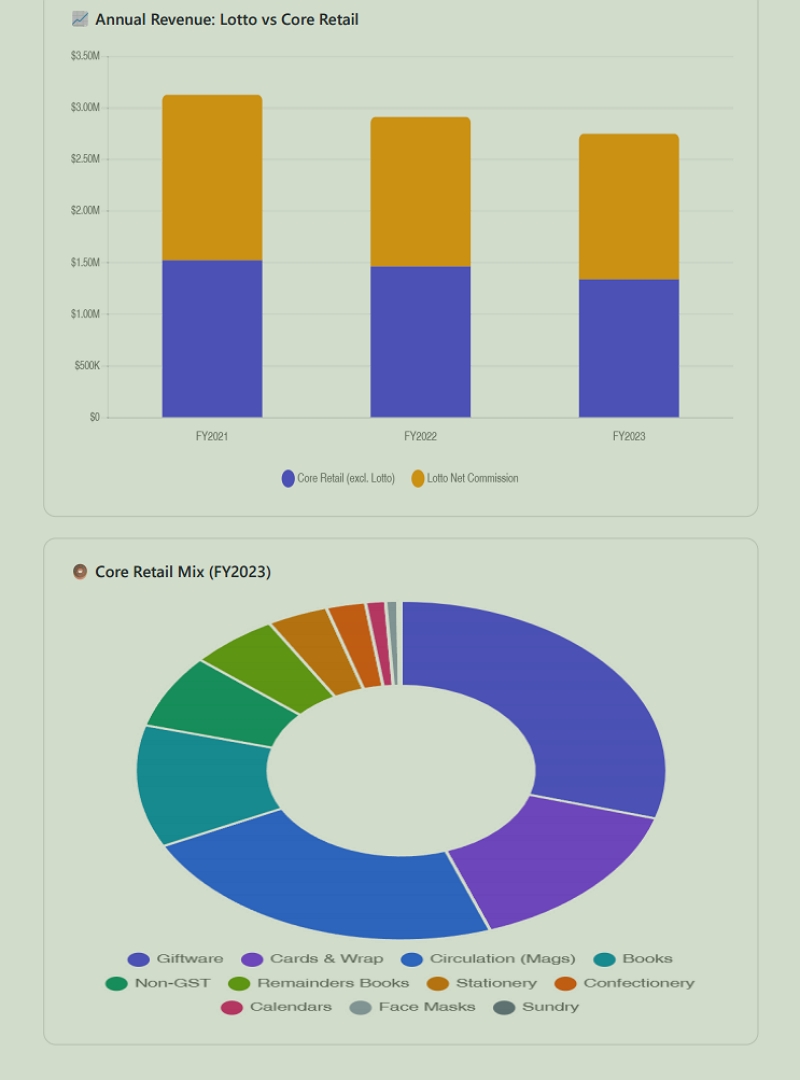
- Asking an AI to generate a visual dashboard makes complex POS reports incredibly easy to digest.
How Are Retailers Currently Using AI?
Retailers who use AI mostly rely on it for marketing tasks, such as writing social posts, drafting emails, and looking up basic information.
For example, our survey showed that when using AI for marketing, retailers tell the AI what they want, explain their target audience, and ask for help. Since they provide this context, the AI does a good job. Many use ChatGPT to write Facebook posts about things like Mother's Day cards, then make a few tweaks before posting. This saves a lot of time.
However, when it comes to management information, most users are not using AI correctly.
Why Do Most SMB Retailers Avoid AI for Business Management?
Most SMB retailers avoid using AI for business management because they worry about costs and feel their current software is good enough. When we asked how many use AI to better understand their business, very few said yes. Most blamed cost and time. Time is a fair concern, but cost shouldn't be, since many AI tools are free.
Shop owners also skip AI because their POS systems already provide reliable data. Many retailers know their business well and don't see the need for AI. Plus, AI is still new, and everyone is learning as they go. Even data professionals find it hard to keep up with all the changes. But every journey starts with a first step, so now is a good time to begin.
Let us start with the basics.
What Is a Commercial Operations Profile (COP)?
A Commercial Operations Profile (COP) is a brief written summary of your shop's location, target market, and competitors that helps AI or anyone else, for that matter, to understand your business. Even the smartest person does not know anything about your specific business unless you tell them. If, as some do, you paste numbers into an AI chat box, the AI will fail to give you useful management advice because it does not know.
For example, if your Point of Sale (POS) system is reviewing winter sales, the AI analysing these figures needs to know whether you are in sunny Queensland or cold Victoria to give you advice.
This is what a COP is designed to overcome.
Creating a COP is the most important step you can take. Save your COP somewhere easy to find. Our POS system has a spot for it, but you can also keep a text file on your desktop to copy and paste into any AI tool you use.
If you want to use AI and are unwilling to pay for it, let me know. As long as you have someone very computer-literate on staff, I can give you a free, very good basic AI.
How Do You Use AI for Management Information?
To get management information from AI, give it your Commercial Operations Profile and a detailed report from your POS system. Start by asking the AI to edit the COP template below with your own details until it fits your shop. The more details you include, the better, but this template works well for most retailers.
My [business type] is located in [centre/area], a well-established neighbourhood retail hub anchored by [anchor tenant], which drives steady daily foot traffic and fosters strong cross-shopping opportunities for speciality retailers like mine. The centre's tenant mix prioritises essential services, making it resilient against economic fluctuations and highly appealing to the local community. This community is characterised by above-average incomes and a [demographic descriptor] demographic, which aligns well with our product and service offerings. Though [competitor 1]'s in-store [categories], as well as online retailers and nearby competitors, pose direct competition, the [centre/area]'s loyal, consistent local customer base provides a robust foundation for growth. Leveraging this strong foot traffic and community connection, we focus on [core categories]
Fill in the blanks and save your COP. Don't worry if it's not perfect right away—you can always improve it later. Now open your AI tool and paste in your COP. Once the AI has your profile, tell it: "I am pasting in this report. Please analyse it and make a report."
Next, go into your POS System and select a report. Now paste it into your AI.
After the AI creates a report, I like to ask it to generate a visual dashboard for the results. A picture can make the information much easier to understand.
Here's a sample AI financial dashboard for a fictitious newsagency. I use the visual dashboard to quickly grasp the main points, while the text report provides more detail. My clients always find these reports interesting to read.
What Are the Best Pro Tips for Prompting AI?
- Speak plainly. If you have a microphone, use it. Speaking is often faster than typing.
- Ask for a result rather than tell it how to do the task. Say something like "I want a report on …" Let it work out how to do it.
- Never waste time debating with the AI. It is not a person and only works with the information you provide. If the information is wrong, the answer will be too. Don't waste time arguing with AI. If unclear, ask for clarification, like, "Redo in Year 8 Australian English" or "Explain so a busy shop owner can understand."
- Feel free to ask more questions. Do not be embarrassed by asking a stupid question; who cares what an AI thinks of you?
What Are Your Next Steps With AI?
Your next step is to test this with your own store's data right now, without spending a cent. First, spend a few minutes filling out the COP template above and save. Try this out with your own store's data now, without spending any money. Fill out the COP template and save it. Then run a basic sales report and let the AI handle the rest.
Conclusion
Getting management information from your reporting software doesn't have to be confusing. Start by giving the AI a simple business profile. Then, ask for a visual dashboard to make complex reports easy to read. Don't let cost stop you from using free tools and start finding hidden trends in your shop today.
Written by:

Bernard Zimmermann is the founding director of POS Solutions, a leading point-of-sale system company with 45 years of industry experience, now retired and seeking new opportunities. He consults with various organisations, from small businesses to large retailers and government institutions. Bernard is passionate about helping companies optimise their operations through innovative POS technology and enabling seamless customer experiences through effective software solutions.