Everyone is very excited to see what AI can do to help run a shop, looking at decisions like staff issues, responding to a customer complaint, checking a lease clause, questioning EFTPOS costs, reviewing slow stock, why cash is tight now, etc.
The information you often need exists somewhere, often online, in such places as a government website, in an Award, inside a supplier document, a POS report, your lease or your financial statements. The problem is finding it quickly, understanding what matters and applying it to your shop.
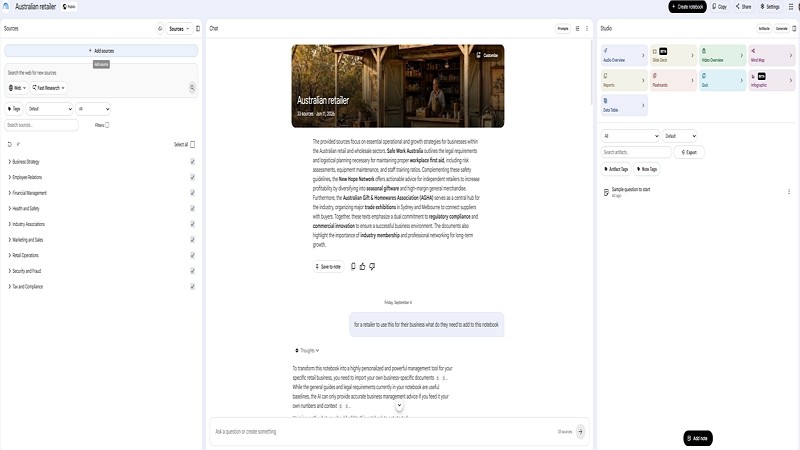
The POS Solutions Retail AI Notebook brings these sources together. It gives Australian independent retailers a practical AI research assistant built around trusted retail information. Add your own reports and documents, and it can help you analyse the questions that matter to your business. I doubt anyone else has anything this sophisticated for retail in our marketplace.
NotebookLM can generate answers based on sources added to a notebook and provide citations that take you back to the relevant supporting material. That makes it useful for reviewing reports, locating provisions in documents and preparing questions for advisers.
The sources are current now, but you need to review them regularly, as employment, tax, consumer, leasing, and payment rules can change, so always check the cited source before acting. In this third version, we're checking them. So you know they are current now.
Key Takeaways
- The POS Solutions Retail AI Notebook has 33 carefully selected sources.
- The sources cover employment, consumer law, tax, payments, WHS, mental health, leasing, store layout and business planning.
- It was made to be particularly relevant to newsagencies, bookshops, pet shops, gift retailers and other independent stores with broad product ranges.
- Add your own POS reports, lease and financial records to personalise it for your specific business.
- The notebook helps you find information, analyse reports and prepare better questions; it does not replace professional advice.
- To request a copy, email POS Solutions for the current access and setup information.
What Is It?
The POS Solutions Retail AI Notebook is a ready-made NotebookLM workspace for Australian independent retailers. It combines regulatory information, practical retail guidance, financial benchmarks and original retail research in one searchable environment.
It is not simply an empty AI tool. The notebook starts with retail-specific Australian sources, so you can ask a question in plain language and get an answer linked to the source material in the notebook.
For example, instead of separately searching Fair Work guidance, the Retail Award and general employment material, you could ask:
“What should I check before changing the roster of a part-time retail employee?”
The notebook can help identify relevant material. Please seek specialist advice if the issue is serious. It's particularly good for explaining what these experts say in plain Australian English.
Where It Matters
We all manage a wide range of responsibilities. You may need to think about wages, stock, margins, customer rights, rent, etc. at any moment.
A good retail AI notebook does not replace your experience or judgement. It helps you find the right starting point faster and makes it easier to connect a business question with the documents and figures that may answer it. What I find it particularly good for is running different scenarios. What if I do this? If I do it, what problems could I face? Don't shy; I often tell it the idea isn't what I want. Could you suggest an alternative? Sometimes I just swear at it when it is off-topic; that works sometimes.
For a retailer, that might mean examining:
- Gift ranges that have stopped turning after a seasonal event
- Book-category performance by supplier or genre
- Stationery sales before and after back-to-school
- Gross margin and stock turn by department
- Space allocated to cards, gifts, magazines, books and stationery
- Magazine sell-through, returns and allocation
- Greeting-card sales and the value of display space
Your POS system already holds important business intelligence. The notebook helps you use that information alongside reliable guidance and your own commercial documents.
What Sources Are Included?
The POS Solutions Retail AI Notebook contains 33 sources. Unfortunately, the free version of NotebookLM includes only 50 sources, so to add more, we have to remove one.
- 31 web URLs and online resources
- Two original Markdown or text documents
The original documents are:
- Research Report: Workplace Crisis & First Aid Management
- Australian Independent Retail Intelligence Report 2026, stored as retail2.txt
The sources are organised around five areas that reflect an Australian retailer's real responsibilities.
Employment and Fair Work
We included the General Retail Industry Award 2020 [MA000004], Fair Work Ombudsman guidance, and related material for common employment questions.
The Retail Award covers employers in the general retail industry and employees who fit the Award's classifications. The Fair Work Commission's consolidated Award incorporates amendments up to and including 1 July 2026.
If that is not your award, you need to change it.
You might ask:
- “What Award information should I check before changing this employee's roster?”
- “What duties may distinguish a Level 1 employee from a Level 2 employee?”
- “What records and steps should I consider before dealing with a stock discrepancy?”
- “What should I check before ending the employment of a part-time retail worker?”
Pay rates and conditions can change. Fair Work publishes current pay guides, including a General Retail Industry Award guide effective from the first full pay period on or after 1 July 2026. [fairwork.gov]
Important: The notebook can help locate relevant guidance and give you some ideas.
Consumer Rights and Pricing
The notebook includes sources on consumer law such as guarantees, price displays, promotions, advertising, card surcharges, spam-related marketing obligations, etc. Recently we had a client who was threatened over his advertisement as it lacked some required details.
For example, you could ask:
- “A gift item is faulty six weeks after purchase. What consumer guarantee issues should I consider?”
- “What should our signage make clear if a 40% discount applies only to selected stock?”
- “What should I review before changing our card surcharge?”
- “What information should appear on a price display before a promotion starts?”
Clear pricing and accurate promotional material protect customers and reduce avoidable disputes. Use the notebook to find relevant guidance, then review the cited official source before deciding.
Tax, Payments and Performance
The notebook includes sources on tax, business benchmarks, financial reports, payment costs, gross margin, GMROI, and business viability.
This is where your own POS reports and financial documents become especially valuable. A generic AI tool cannot know whether your margins are falling, whether gifts are tying up too much capital or whether your rent is becoming harder to support. Your reports can provide that context.
For example, you could ask:
- “Over the last 12 months, what departments grew in sales but fell in gross margin?”
- “What stock has not sold in 12 months?”
- “Which gift suppliers have the lowest stock turn?”
- “Compare greeting cards, gifts, books, magazines and stationery by sales, gross profit and stock turn.”
- “Which categories may deserve more or less floor space?”
The ATO says business benchmarks help businesses compare selected financial ratios with similar businesses and should be reviewed at least annually before lodging a tax return. For newsagents, the ATO's benchmark material identifies cost of sales as a key ratio for assessing turnover.
Benchmarks are not instructions. They prompt you to investigate. If a figure sits outside a benchmark range, the reason may be product mix, rent, wages, location, business model, reporting differences, growth investment or an underlying problem.
WHS, First Aid and Well-being
Retail businesses need straightforward procedures for the unexpected: a medical emergency, a customer incident, a workplace injury, an aggressive situation or staff distress.
The notebook includes WHS, first-aid and mental-health material to help retailers prepare practical store procedures.
Questions might include:
- “What should our first-aid procedure include if a customer collapses near the counter?”
- “What should staff do immediately after an incident in the shop?”
- “What information should be recorded after a workplace injury?”
- “What support pathways could we include in a simple staff well-being policy?”
A retailer often carries staffing, customer and financial pressures. Having reliable support information now, with clear procedures available during a crisis, is very useful.
Of course, for an emergency or immediate health and safety risk, contact the relevant emergency service ASAP.
Store Operations and Leasing
The notebook also includes material on customer flow, store layout, visual merchandising, retail leasing, plastics obligations and business-sale planning.
For newsagencies and speciality retailers, layout is not simply about making the shop look good. It affects how customers move, what they notice and which ranges receive browsing time.
You could ask:
- “How can I improve customer flow between the counter, greeting cards and gift departments?”
- “Which high-margin categories should be more visible from the entrance?”
- “Which slow-selling ranges occupy too much valuable floor space?”
- “How can I place gift products near greeting cards to encourage sales?”
- “What lease dates are coming up soon?”
Your lease can be one of the most important documents in the business. Once you add it to your private notebook, you can ask it to help identify clauses dealing with rent reviews, outgoings, make-good obligations, renewal options, assignment and notice periods.
That does not mean the notebook can interpret a lease as a solicitor would. It can help you identify the clauses and questions worth taking to a solicitor, landlord or leasing adviser.
The Retail Intelligence Report
The Australian Independent Retail Intelligence Report 2026 is the notebook's central strategy source. It gives the AI broader context on the commercial realities facing independent Australian retailers.
It includes:
- Volume One: Market Reality and the Transformation Imperative, Chapters 1 to 12
- Volume Two: Operational Benchmarks and Financial Metrics, Chapters 13 to 33
- Volume Three: Strategic Implementation Frameworks, Chapters 34 to 49
- Volume Four: Future-Proofing and Strategic Foresight, Chapters 50 to 60
- Appendices A to L: Worksheets, checklists and templates
The report helps connect individual decisions. A weak category may not simply be a buying problem. It may involve stock turn, gross margin, display position, discounting, customer traffic, supplier terms or the category's strategic role in the store.
For example:
“Review my last 12 months of gift-category sales, gross margin and stock turn. Identify the five poorest-performing suppliers, then suggest the questions I should investigate before changing the range.”
Make It Your Assistant
The 33 sources provide the general retail foundation. Your own documents make the notebook specific to your business.
Start with reports that are clear, recent and useful.
Useful POS Reports
Consider adding:
- Sales by department, category and supplier
- Sales by item or SKU
- Gross-profit and gross-margin reports
- Stock-on-hand reports
- Stock-turn reports
- Dead-stock and slow-selling-stock reports
- Discount and promotion reports
- Sales comparisons by month, year, store or channel
- Customer, loyalty or transaction summaries where appropriate
For best results, use clearly named reports covering a consistent date range. Monthly PDF or spreadsheet reports are often easier to work with than large, raw transaction exports.
A useful prompt could be:
“Review this 12-month sales-by-category report for my suburban newsagency. Identify the five largest sales declines, show whether gross margin also fell and suggest questions I should investigate before changing the range.”
Add Your Lease
Your lease gives the notebook access to dates, rent reviews, outgoings, options and obligations that can shape your fixed costs.
Try asking:
“List the important dates in this lease coming soon, including rent reviews, option deadlines, notice periods and expiry dates.”
Add Financial Documents
You may also add tax returns, BAS statements, profit-and-loss reports or balance sheets that you are comfortable storing in your Google account.
These documents can help you investigate questions such as:
“Using my financial statements and the benchmark sources in this notebook, which expense ratios need further investigation, and what are three possible reasons for each?”
Protect Your Information
Use sensible precautions to protect your privacy.
Your POS reports, lease and financial records may contain commercially sensitive or personal information. Before uploading to your notebook, review the access settings and sharing permissions.
For a retailer using your notebook, the practical protection is:
- Use a strong, unique password for the Google account.
- Turn on Google two-step verification.
- Keep the notebook private rather than sharing it publicly.
Share it only with specifically invited Google accounts if staff or advisers need access. I suggest not sharing it with anyone. You can always send the relevant material without giving them access to the notebook itself.
Ask Better Questions
The best questions are clear about the report, time period, store type and decision you need to make. Ask clear questions, and you'll get clear answers.
Try questions such as:
- “Based on the Retail Award, what information should I check before changing this employee's roster?”
- “Summarise the consumer guarantee principles relevant to this customer complaint.”
- “Review my merchant statement and identify EFTPOS fees I should question.”
- “Which departments have declining sales and declining gross margin?”
- “What stock has not sold in 12 months, and how much capital does it represent?”
- “Which greeting-card and gift ranges produce the strongest return on stock investment?”
- “What lease obligations and dates should I put into my calendar?”
- “What are the main first-aid and emergency procedures this shop should have?”
- “Which categories appear to deserve more floor space?”
- “What questions should I take to my accountant after reviewing these reports?”
The most effective approach is to give the notebook context.
Instead of:
“Why are sales down?”
Try:
“Review this 12-month sales-by-category report for my suburban newsagency. Compare gifts, greeting cards, magazines, books and stationery. Identify the largest sales declines, show whether gross margin also fell and list the questions I should investigate before changing the range.”
Important Limits
The POS Solutions Retail AI Notebook is designed to help you find information, analyse reports and prepare better business questions. It is not legal, tax, financial, employment, medical or emergency advice.
Although this notebook is set for low hallucinations, they do happen. The notebook may misunderstand a question, miss an exception, work from incomplete business data or rely on a source that needs updating. Also remember you know a lot more about many things than this AI assistant, so like anyone you ask for advice, check before acting.
What I find useful is using it before I meet an expert to become better prepared; some examples might be:
- Identify relevant Award clauses before speaking with an HR adviser.
- Review sales and margin trends before meeting your accountant.
- Locate lease dates and clauses before consulting a solicitor.
- Prepare a store safety checklist before seeking WHS guidance.
- Investigate stock and category trends before committing to a buying decision.
That is where the real value lies: less time hunting for information, better questions and more productive conversations with the people who advise your business.
Get a Copy
The POS Solutions Retail AI Notebook is available to blog readers who want a practical AI assistant for their retail business.
To request access:
- Email POS Solutions and ask for the Retail AI Notebook.
- We will provide the current access and setup information.
- Create your own copy under the Google account you control.
- Add selected POS reports, such as sales, margin, stock and category reports.
- I suggest adding your lease if you want help finding key dates and commercial obligations.
- I also suggest adding relevant financial reports, BAS statements, or tax information to review financial performance and benchmarks.
- Add more sources if required.
What to do?
Email POS Solutions today to request your copy of the Retail AI Notebook. Create your own private copy, add the business information you want it to analyse, and start turning POS data, retail guidance, and commercial documents into more useful decisions for your shop.
Detailed notes on how to use NotebookLM are available here. I would say plan about half an hour to go through the details.
Written by:

Bernard Zimmermann is the founding director at POS Solutions, a leading point-of-sale system company with 45 years of industry experience. He consults to various organisations, from small businesses to large retailers and government institutions. Bernard is passionate about helping companies optimise their operations through innovative POS technology and enabling seamless customer experiences through effective software solutions.