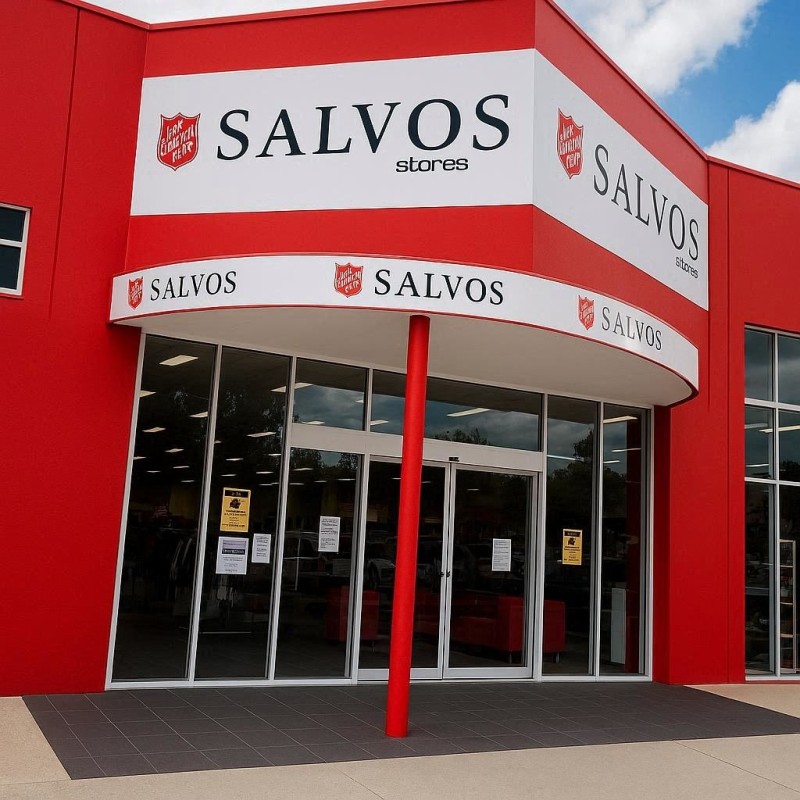
Choosing the right Charity (op shop) POS system in Australia is not the same decision as choosing retail software for a regular store. Donors bring stock directly to your door. Every donation arrives as a unique, one-off item. You rely on volunteers who give their time generously but may turn over frequently. We know that we have a lot of charity shops using our system now, community hospitals, Salvos, etc.
All our charity shops face the daily challenge of keeping shop sales and donations clearly separated. What we find is that standard retail POS will frustrate your volunteers and leave your people doing manual corrections at the end of every week. But our purpose-built, tested charity shop POS transforms how you work, making every shift smoother for your entire team.
Let's look at exactly what features you need to run a smarter Charity op shop.
A Note on Hardware Flexibility
Before we dive into the software, remember that hardware flexibility matters. Not every charity shop has the budget for brand-new, top-of-the-line registers. You can have them in our system, but you do not have to.
Make It Simple for Volunteers
Charity Op shops often see high volunteer turnover, so your system must be easy to learn. If the software is complicated, volunteers are more likely to make mistakes. Transactions get voided incorrectly. Prices get entered in the wrong fields. The queue at the counter builds up while someone tries to remember which button to press.
A truly volunteer-friendly POS System like ours uses large, colour-coded buttons for product categories on the main screen. Often, volunteers do not need to search for individual items. They tap the category and enter the price.
Speed
The industry standard is 40 seconds per transaction, plus 3 seconds per item. So if a sale has three items, the time is about 40 seconds plus 9 seconds per item in their basket. Thus, you are looking at about 50 seconds.
Consider this:
80% of customers say they are unwilling to wait for more than 5 minutes in line. So if your queue is six people, there is an 80% chance that someone will walk out.
Retailer needs speed.
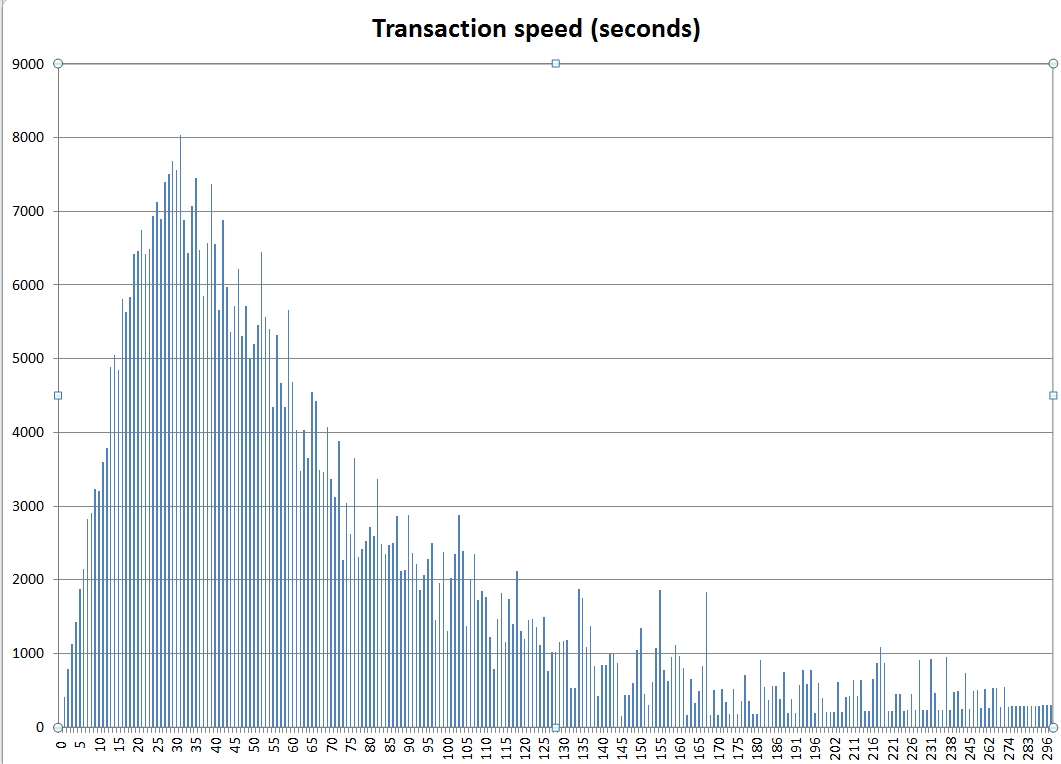
I extracted about 20,000 cash register transactions from one of our clients' systems. Here is what the graph above looks like for transaction speeds. As you can see, our average transaction time was 36 seconds per sale. In a pinch, our client was doing much better.
On speed, I am sure we beat almost any POS system on the market.
Handle One-Off Donated Stock With Ease
Here is the inventory challenge that every op shop manager knows well: you do not have supplier barcodes or consistent stock levels. So, how do you manage donated goods inventory management without it becoming a full-time job?
The answer is generic department pricing buttons. Rather than creating an individual product record for every shirt or vase, you set up categories like "Menswear," "Bric-a-Brac," or "Books". Then you have clear, tappable buttons so that when a customer brings that item to the counter, the volunteer taps the category and manually enters the price from the tag. The system records the sale against that department. It's quick.
For items that require specific tracking, our point-of-sale system lets you make in-house barcodes quickly. After you print a label, stick it on the item. Then scan it at the counter like a standard product. It is practical and keeps the checkout fast.
Keep Donations Separate From Your Retail Sales
Many charity op shops accept cash donations directly at the counter. This is highly convenient for your supporters. However, lumping those funds in with your retail sales data creates a major reporting problem. Our reliable POS system for charities in Australia lets you set up a dedicated "Donation" button on the screen. When a supporter donates, the volunteer taps the button and enters the amount. Your POS categorises funds as non-taxable donations instantly.
While processing these donations, your POS should also allow for easy donor capture. Recording a donor's name and email right at the counter lets your charity send automated thank-you messages. This helps you build stronger community relationships and encourages future support.
EFTPOS
We do not lock you into any EFTPOS system; you are free to select whoever you want. Because we have so many EFPTPOS suppliers linked into our system, you can really shop around.
Issue Proper Tax-Deductible Receipts
If your charity holds Deductible Gift Recipient (DGR) status, your supporters are entitled to a tax-deductible receipt for any donation over two dollars. The last thing you want is a supporter asking for a receipt and your volunteer not knowing how to produce one. Our POS software lets you customise your receipt footer. You can easily add your ABN, your DGR status details, and the exact wording required by the Australian Taxation Office (ATO). Then, when a volunteer processes a donation at the counter, the system automatically prints a legally compliant receipt. You can also automatically email it.
Issuing the right receipts is only one part of keeping your financials clean, and connecting your POS to your accounting software handles the rest.
Connect Directly to Your Accounting Software
Manual data entry errors account for a significant share of financial discrepancies in small nonprofits. If your admin team manually re-enters daily totals into your accounting software at the end of every shift, you are wasting valuable time.
Strong charity retail accounting integration changes everything. Our charity op shop POS integrates directly with leading Australian platforms, including Xero and MYOB. At the end of each trading day, your totals automatically sync. Your retail sales, EFTPOS settlements, and cash donations are pushed through to the correct accounts without any double-handling.
Want to see how the sync works? Book a free 15-minute demo. We'll walk you through a live op-shop setup and show you how much time you will save.
Protect Your Data With Manager Controls
Volunteers are wonderful, but accidents happen. A transaction gets deleted accidentally. A discount gets applied that shouldn't have been.
In a charity shop, these errors drain revenue and create compliance issues for you. So we can protect your data with a comprehensive manager permission system. You can lock functions like voids, refunds, or large discounts behind a manager PIN.
Furthermore, the system logs almost every action taken on the POS. This clear audit trail shows exactly who processed a refund or correction.
Handle High-Value Donations and Bids
Occasionally, a generous donor drops off something genuinely valuable, like a piece of vintage jewellery or an antique. These items need a different approach at the checkout.
A flexible POS lets you set up a quote or bid system. Interested customers can register an offer on a high-value item directly through the till.
You should also consider lay-by options for customers who want to pay off a larger purchase over time. This ensures you get the best possible return for your premium donations.
Manage Everyday Discounts and Welfare Pricing
At the other end of the pricing scale, charity op shops also need flexible discount tools to quickly find and move older stock.
Your system should easily handle colour-tag sales. For example, you can set a rule that all items with a green tag are half price this weekend. The POS automatically applies the discount, so the volunteer doesn't have to do the math. You should also be able to process concession pricing for welfare cardholders or "free but tracked" items for emergency relief vouchers. Tracking these giveaways is vital so you can report the full scope of your community impact to your board.
Reports That Work for Charity Shop Managers
End-of-day reporting is essential for running an accountable op shop. A basic till summary is not enough for a charity board. You need clear insights to make confident decisions.
Key Reports Your Charity POS Should Produce:
- Sales by department: See exactly which categories (like homewares or clothing) bring in the most revenue.
- Stock variance: Compare what you processed against what you expected.
- Donation totals: Keep direct donations entirely separate from retail sales.
- EFTPOS reconciliation charity data: Match your card payments perfectly against your bank statements.
- Cash reconciliation: Ensure your cash drawer matches your recorded sales securely.
Scale Across Multiple Stores and Channels
Many Australian charity organisations operate more than one op shop. Managing them with disconnected systems creates massive headaches for area managers.
POS Australia offers true multi-store support. Managers at the head office can see sales and stock data across all stores in one place. Setting up a new store becomes straightforward, and the volunteer training remains the same across all locations.
You should also look for a system with reliable offline capability. If your internet drops out on a Saturday afternoon, your POS must keep working and sync the data later. Additionally, if your charity shop is expanding into e-commerce, consider our online links that let you push your donated items directly to platforms like eBay or Facebook Marketplace from your main system.
What to Look for in a Charity Shop POS: A Quick Checklist
Before you make any software decision, run the system against these core criteria:
- [ ] Simple enough for a first-time volunteer to learn in 15 minutes.
- [ ] Supports category-based pricing for unique donated stock.
- [ ] Automatically separates donation income from retail sales.
- [ ] Produces compliant DGR tax receipts for donors.
- [ ] Integrates seamlessly with Xero or MYOB.
- [ ] Features manager PIN controls and a secure audit trail.
- [ ] Handles bids, lay-bys, and colour-tag discount rules easily.
- [ ] Works offline, so you never miss a weekend sale.
The Right POS Makes Every Shift Easier
A charity shop POS system needs to do more than take payments. It should be simple enough for any volunteer, flexible enough for one-off donated goods, and robust enough to give your managers clear control over every dollar.
The right system saves your team hours of admin time, stops costly till errors, and gives your organisation complete financial clarity. When your operations run smoothly, more of your energy goes exactly where it belongs — toward your mission.
Ready to give your volunteers a POS they'll actually enjoy using? Book a free demo, and we'll show you exactly how it handles donated stock, DGR receipts, and Xero sync in a real charity shop environment — no lock-in, no jargon.
Written by:

Bernard Zimmermann is the founding director of POS Solutions, a leading point-of-sale system company with 45 years of industry experience, now retired and seeking new opportunities. He consults with various organisations, from small businesses to large retailers and government institutions. Bernard is passionate about helping companies optimise their operations through innovative POS technology and enabling seamless customer experiences through effective software solutions.
*** Would you like me to highlight any specific sentences as a "Tip", "Warning", or "Info" box to make certain points stand out in the HTML?