
Point of Sale Software

Here are some Articles from the Blog Subject - management -

A business plan

POS SOFTWARE


If you are like me about now is the time of year that you look at your business and your business plans. It gives you a chance to access how you have done, what you did right, what mistakes you made in your planning and where you want to go. So I think it is not essential, but it is a good idea.

In my experience, there are three reasons SMB will do business plans, none of which are mutually exclusive

1) To clarify their thoughts

2) Get stakeholder and key staff on the same page

3) They need money from banks, lending institutions or investors.

The closer to (3) the more likely, I find that the business plan is professionally designed and written up.

A business plan generally takes about 10 to 20 hours of work, and it tends to be a lot of work. I know I am going back and forwards from our financial and helpdesk software to get figures and asking heaps of people for what they think. 

Now there are three main ways of doing it.

1) Use a template 

This would be my recommendation for starters, and if it does not work out at least, you know something about it and have an idea of what you need.

Most of the banks do provide their customers such a template free. The big advantage of using their one is that you will find their loan officers tend to think in the same terms.  

The Australian government does provide a free one too here.

2) Use some software

I used to recommend this as it does reduce the time to write a business plan by half. However what I discovered is that unless you are writing a lot of business plans but happened was that what the user gained in time using the software, they lost it in the time required to learn to use the software. The other issue as it only used occasionally, once mastered it has to be relearned the next time around.

3) Get a professional to write one up. If you are getting a professional, say 15+ hours of work at $250/hour is about $4,000. Remember although a professional knows what they are doing they need to get the information out of you, and they need to understand the business, this will take them many hours. 

Once you have a business plan, what you will find is that as time goes on, it does not take long to adapt it to the current date. 80% is the same, and it is only 20% that changes.

Finally, do not worry about it not being perfect, nothing ever is.

“A good plan now is better than a perfect plan next week.” ― General George S. Patton 



Add new comment

Restricted HTML

  • Allowed HTML tags: <a href hreflang> <em> <strong> <cite> <blockquote cite> <code> <ul type> <ol start type> <li> <dl> <dt> <dd> <h2 id> <h3 id> <h4 id> <h5 id> <h6 id>
  • Lines and paragraphs break automatically.
  • Web page addresses and email addresses turn into links automatically.
CAPTCHA This question is for testing whether or not you are a human visitor and to prevent automated spam submissions. Image CAPTCHA
Enter the characters shown in the image.

Tortoise vs Hare

POS SOFTWARE

There is a famous story of the race between the Tortoise vs Hare, where the arrogant and over-confidence hare is is beaten by the steady tortoise.

Well, check what happens in real life when they race.

It is not actually an accident as this race been done a few times with 

The tortoise wins not because he was slow and steady as many say but because the hare stops while the tortoise won because it was focused and maintained consistency.

Like the tortoise we need to focus on the things will control, not get distracted and stay focused on the goal.


Add new comment

Restricted HTML

  • Allowed HTML tags: <a href hreflang> <em> <strong> <cite> <blockquote cite> <code> <ul type> <ol start type> <li> <dl> <dt> <dd> <h2 id> <h3 id> <h4 id> <h5 id> <h6 id>
  • Lines and paragraphs break automatically.
  • Web page addresses and email addresses turn into links automatically.
CAPTCHA This question is for testing whether or not you are a human visitor and to prevent automated spam submissions. Image CAPTCHA
Enter the characters shown in the image.

HOW TO SAVE ON SHIPPING

POS SOFTWARE

Courier services

We have clients now that are doing the bulk of their business through delivery.  

The big problem is often that the public is demanding free delivery. You can work this to your advantage by setting a minimum order amount for free delivery. 

So I suggest that you take the time to figure out your delivery logistics so that it is both efficient and affordable to your business.

If you’re looking for ways to cut costs on delivery, here are a few suggestions.

* Can you make a route and do it yourself? One big plus here is that by going to the customer, you can maybe pick up more orders.

If not, then let’s begin

*  Try asking businesses near you who they use and why?

Now get quotes from a few delivery companies and some will be cheaper for some areas for others.

Make sure that all these costs are listed as you could find unexpected extra charges coming in. What I do find surprising is that you will find sometimes the costs vary greatly between areas that are very close.

Some delivery companies run specials which you can tag onto eg one may say on Thursday they have a cheaper rate so you would push delivery to your customers on those days. If they have an Xmas special, you can use that too.

Investigate their other services, e.g. the COD service which we find very useful. 

 You want a decent tracking service from the delivery company, there are always problems and you often need to find out where your goods are. I find being able to find out exactly where the parcel is and how long before the customer can expect its arrival makes me look very professional.

As you will probably be using more than one delivery company, an average client of ours doing lots of deliveries, I would say is using two to five delivery companies.

* You need a tape measure and scale, as most delivery agents require both measurements for their costings. If you do not provide these, the delivery company driver will often estimate these and you could be paying more. 

Reduce the parcel size and/or the number of cartons both can often dramatically reduce the price. 

If you start to find that you are shipping a lot, then you can look into:

* Insurance who pays for this? I would suggest getting your insurance agent to give you on your business policy, shipping insurance which works out much cheaper than the delivery companies insurance policy.  

* Save on packaging costs by buying in bulk

* You will be able to negotiate better discounts from deliveries. 

Hope this all helps.


Add new comment

Restricted HTML

  • Allowed HTML tags: <a href hreflang> <em> <strong> <cite> <blockquote cite> <code> <ul type> <ol start type> <li> <dl> <dt> <dd> <h2 id> <h3 id> <h4 id> <h5 id> <h6 id>
  • Lines and paragraphs break automatically.
  • Web page addresses and email addresses turn into links automatically.
CAPTCHA This question is for testing whether or not you are a human visitor and to prevent automated spam submissions. Image CAPTCHA
Enter the characters shown in the image.

7 Tips for fairs and shows

POS SOFTWARE

Trade fairs

Watching the Cake and Bake Show this weekend and as over the years, I have done a lot of trade shows and fairs, and so I've put together 7 tips you should think through before going to a fair.

Is the fair right for you?

This is the big question. In my experience, people going to fairs are very tuned onto the theme of the show. If you sell a product that is not in line with the theme for some of them, you are probably wasting your time coming.

Do a budget on what it will cost and then ask yourself, is it going to be worth it? 

Product

Do you have the right product at the right price for the people that are coming?

A useful tip here, is to contact your suppliers and ask them for help. Many suppliers have special stock for fairs. Often they will provide product, signage and promotional material free for you too. 

Location

In real estate, they say the value is determined by "location, location and location."  If the organiser is not giving you a decent location, I would seriously think about not coming. Generally, I refuse to go.  There is no point in accepting an allocated location that puts your stand in the shows wasteland, its Siberia or Antarctica even if it is really cheap. 

Collection of people's information

You want to get new customers so plan on getting peoples names and email addresses, if possible have someone collect names and email addresses. 

Also have business cards, brochures, and promotional material for people to leave with.

Your stand.

Does it look presentable?

You need banners and signs.

Do you have access at the show to the internet and your point of sale software? At the show, you are going to be hit by questions and you need to have as much access to information as you possibly can.

Staff

I noticed what looked really bad at the cake show was on one stand a young man who probably was a family member serving behind the counter in shaggy clothes and was unshaven. I am sure that many of the people at this show were not impressed either. It did not create a good impression with me. Make sure your staff are appropriately dressed.

You need a technical person for your products besides answering questions for prospective and existing customers, they can also handle the timewasters. You are there at the show for business and you really do not want people to lose your time with kids doing university courses asking you questions for their assignments. 


Something to attract people to your stand.

A special offer, a free sample, some new interesting product, a little show, anything just something that will get people walking past to stop at your stand and look.

Payment type

Almost every stand at a show today takes cash, visa, afterpay and zippay and they are all being used. There is no such thing as layby at a show.  You need to have as many payment types as you possibly can.

Hope this helps.

Remember one point although it is not the reason you are there, it is almost a fun place to go, so have fun too and it is a great chance for you to network.


Add new comment

Restricted HTML

  • Allowed HTML tags: <a href hreflang> <em> <strong> <cite> <blockquote cite> <code> <ul type> <ol start type> <li> <dl> <dt> <dd> <h2 id> <h3 id> <h4 id> <h5 id> <h6 id>
  • Lines and paragraphs break automatically.
  • Web page addresses and email addresses turn into links automatically.
CAPTCHA This question is for testing whether or not you are a human visitor and to prevent automated spam submissions. Image CAPTCHA
Enter the characters shown in the image.

EFTPOS with Tap & Save price reductions

POS SOFTWARE

What happens with EFTPOS and Credit transactions is that you get charged by everyone in the loop. For example, say the money goes from the customer's bank, into a transaction stream, which goes to another bank, the money is then moved into a new transaction stream, and then the money is transferred into your bank account, each transfer on this chain is being charged. So what happens is that each point of the chain is charging the next point of the route until it reaches you.  As you have no one to charge, you get the bill. 

What Tap & Save does, only available now with tyro EFTPOS,  is check what possible routes are available for the money to move from the customer's bank account to your account and then directs the money to be moved along the cheapest path.  The big plus here is that you save money without having to change anything. 

Overall the savings are in the order of 8.4% reduction in charges but this varies depending on what exactly is the route the money is travelling now. 

So I decided to see a benchmark of our clients EFTPOS over the past six months although I am still waiting for confirmation, I calculate that the savings with Tap and Save are 8.74% in our market space.


Add new comment

Restricted HTML

  • Allowed HTML tags: <a href hreflang> <em> <strong> <cite> <blockquote cite> <code> <ul type> <ol start type> <li> <dl> <dt> <dd> <h2 id> <h3 id> <h4 id> <h5 id> <h6 id>
  • Lines and paragraphs break automatically.
  • Web page addresses and email addresses turn into links automatically.
CAPTCHA This question is for testing whether or not you are a human visitor and to prevent automated spam submissions. Image CAPTCHA
Enter the characters shown in the image.

Power of 1%

POS SOFTWARE

Increase by 1%

Peter Abeles one of Australia's greatest businessmen in his book talked about how just 1% difference could make a huge difference to a business. What he recommended was looking at significant factors in a business and trying to change them by 1%. 

Of course, nothing can look at a business better or faster than a computer.

Now here might be an example of how looking at your business reports can help in a cafe doing $600,000 turnover. So we are $6,000 ahead every year.

Say you could increase your basket size by 1%, that is $6,000 sale increase. So we are $12,000 ahead.

Say you could reduce not charging people, always a big problem in a cafe in my experience. People order goods and someone forgot to charge them, maybe a 1% increase in sales or $6,000. So we are $18,000 ahead.

Say you could speed up your orders by 1%, people in cafes rarely like to wait in a queue. Even if only 50% of that produced an extra in sales, that is another $3,000 sale increase. So we are $21,000 ahead.

Say you could with your point of sale systems VIP club get 1% more in sales, that is another $6,000 sale increase. So we are $27,000 ahead.

Say you could increase your prices by 1% by encouraging better products to be sold, that is another $6,000 sale increase

It is all adding up fast.

Etc 

Just imagine in your business if you can get a 1% improvement.


Add new comment

Restricted HTML

  • Allowed HTML tags: <a href hreflang> <em> <strong> <cite> <blockquote cite> <code> <ul type> <ol start type> <li> <dl> <dt> <dd> <h2 id> <h3 id> <h4 id> <h5 id> <h6 id>
  • Lines and paragraphs break automatically.
  • Web page addresses and email addresses turn into links automatically.
CAPTCHA This question is for testing whether or not you are a human visitor and to prevent automated spam submissions. Image CAPTCHA
Enter the characters shown in the image.

Tips on naming your computer

POS SOFTWARE

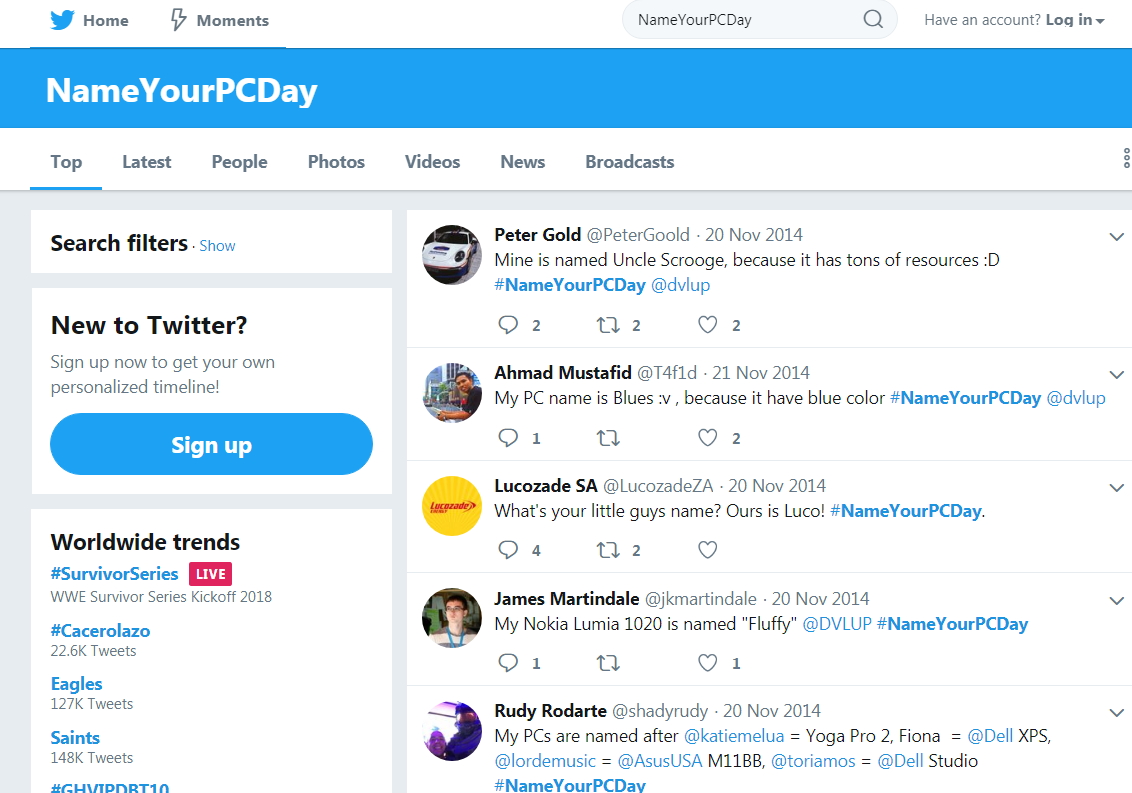
Today is Name your computer day


Name your computer day

So it is an excellent time to review and give you some tips in naming your computer.

Basically, I suggest a name that reduces confusion and allows it to be easy to remember. Also like a pet, today most people like to give their computer a name.

Generally what happens in retail, is some technically minded person comes along and sets up your computer. With a big smile, they turn around to you and ask you what do you want to call your computer?   

Since it is not so easy to change in a retail environment unless you are very technical minded as a simple name change can muck up things, I do suggest that you give it some thought because you are going to be stuck with this decision for many years.

I do not recommend that you call the computer by function, the problem here is that you may be installing it for accounts, but soon it probably will be moved around to something else like a cash register so it will be called the accounts computer even though it is now a cash register. So you will be ringing up for support saying to a technical person, the cash register is down and its the accounts computer. The same problem can occur if you use location. If what was the computer is moved to the storeroom and it is now confusing. The storeroom computer is called the "back computer", the back computer is now called ....

Here are some ideas.

One advantage to using the manufactures name is that it is clearly marked which one it is and you just hope that you do not get another computer of the same name in the shop. 

If you want to be a little creative be inventive a white computer in my house named snow white and a media computer for movies got called the_box. 

If people in the shop are into the Game of Thrones, then the characters name there are recognisable and memorable. Here are some more ideas, what about naming computers after planets, biblical characters, superheroes, etc.

Try to avoid girlfriends and boyfriends just in case they are no longer around, and the last thing you want is to be kept reminded of that. 

If you want some more tips here are some more ideas.


See how you go?


Add new comment

Restricted HTML

  • Allowed HTML tags: <a href hreflang> <em> <strong> <cite> <blockquote cite> <code> <ul type> <ol start type> <li> <dl> <dt> <dd> <h2 id> <h3 id> <h4 id> <h5 id> <h6 id>
  • Lines and paragraphs break automatically.
  • Web page addresses and email addresses turn into links automatically.
CAPTCHA This question is for testing whether or not you are a human visitor and to prevent automated spam submissions. Image CAPTCHA
Enter the characters shown in the image.

Problem with cloud storage

POS SOFTWARE

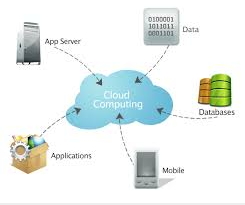
Cloud_point_of_sale.jpg

A word of caution:

Cloud storage as it is a third-party system is inherently risky. What it is, is another person's computer that you are putting on your information.

If that computer is in another country, then the information is also subjected to another country's legal system, in some cases, this may be an issue with Australian law. 

More importantly for most of our clients is that there are numerous examples of cloud providers evaporating like the cloud they are named and information being lost despite these people using well-established companies like Microsoft.

For example:

One of our clients a few days ago just got burnt. What happened is that he hired a professional photographer a few months ago to photograph his shop. This the photographer did and then gave him a USB stick with the photos on it. Then my client did was look for a good deal and then signed up to a cloud storage service. He then transferred the photos to this online cloud storage and thinking that as he had the pictures, he could score a USB stick for other tasks, so he reused the USB stick.

He needed the pictures a few days ago and discovered that the photos were gone from the cloud. He then in a panic contacted the cloud provider to ask where the images are? He was told that as he had not used the account for 60 days, the account was automatically cancelled and so the photos were lost. Now he has no pictures, and the photographer has to come back.

The solution is

If you are going to use cloud storage, I recommend that you also use as a backup an external hard drive just in case. For a few hundred dollars you can pick up today a massive hard drive. You will not be sorry if you have too many copies. 


Add new comment

Restricted HTML

  • Allowed HTML tags: <a href hreflang> <em> <strong> <cite> <blockquote cite> <code> <ul type> <ol start type> <li> <dl> <dt> <dd> <h2 id> <h3 id> <h4 id> <h5 id> <h6 id>
  • Lines and paragraphs break automatically.
  • Web page addresses and email addresses turn into links automatically.
CAPTCHA This question is for testing whether or not you are a human visitor and to prevent automated spam submissions. Image CAPTCHA
Enter the characters shown in the image.

Make a shop user guide

POS SOFTWARE

User guide for a POS Software

This is a tip. Open up a computer editor like notepad or Microsoft Word and start a user guide making pages on what to do at the end of the day, week, month, quarter and year end. Now save it on the windows screen. This is now your user guide.

I also put in my user guide pages for computer procedures, contact information for the specialist for a particular point and just about everything else that I may need as I discover it such as extras like the procedures to return goods to supplier ABC, etc.

So the next time you do any of these tasks you write in the user guide step by step exactly what you did, e.g. you go to this document, put these options in here, then print off a copy and then send this copy to person XYZ. Now you go to this website and enter these figures in there. Now you do this... 

The reason I say use an editor is so you can edit and add extra items as they catch your eye.

The problem is often that you do a quarter processing for GST and then you do not usually remember all the steps the next time it needs to be done. So the idea is that soon this user guide will give you and your staff a set of instructions that you all can turn to for guidance. This user guide is not something that you write once and never look at again. I run through it religiously before doing the task, and if I discover a better way of doing something, I edit and change it. At all times I make sure that everything is up to date. 

This user guide will save you heaps of time. 

Add new comment

Restricted HTML

  • Allowed HTML tags: <a href hreflang> <em> <strong> <cite> <blockquote cite> <code> <ul type> <ol start type> <li> <dl> <dt> <dd> <h2 id> <h3 id> <h4 id> <h5 id> <h6 id>
  • Lines and paragraphs break automatically.
  • Web page addresses and email addresses turn into links automatically.
CAPTCHA This question is for testing whether or not you are a human visitor and to prevent automated spam submissions. Image CAPTCHA
Enter the characters shown in the image.

Busiest retail days of the years coming!

POS SOFTWARE

Are you prepared for Christmas?

Being prepared

 We are now to the start of this year's festive season, have you checked to make sure that everything technically works? 

Here is an interesting question to ask yourself, what will be the cost to your business if you suffer a Point of Sale outage on this holiday? 

If you want to deliver the level of service that your customers demand, check that your computer system is working correctly now!


Add new comment

Restricted HTML

  • Allowed HTML tags: <a href hreflang> <em> <strong> <cite> <blockquote cite> <code> <ul type> <ol start type> <li> <dl> <dt> <dd> <h2 id> <h3 id> <h4 id> <h5 id> <h6 id>
  • Lines and paragraphs break automatically.
  • Web page addresses and email addresses turn into links automatically.
CAPTCHA This question is for testing whether or not you are a human visitor and to prevent automated spam submissions. Image CAPTCHA
Enter the characters shown in the image.

Another court case over

POS SOFTWARE

 Although I do not want to name names, one of our clients, a small newsagent has finally settled with one of their old suppliers their case. The amount of money our client has recovered about a quarter of a million dollars which is not all their loss and they have to bear their costs which will make a substantial dent to the payout figure.  I will not be surprised if it is over half the payout amount.

So I think it is a good example to discuss the dangers of taking on agency sales in modern retail. 

An agency sale is a product for sale that a retailer markets on behalf of another organisation e.g. transport tickets,  bill payments, dry cleaning drop-offs, transport, lotteries, etc. Often the payout is seen partly in the number of customers coming to the shop to get these items. As the margins on these products tend to be low, to get a decent return you need a lot of sales which became the problem here as you will see. Say you make $20,000 at 2% margin you are looking at a million dollars of turnover. 

What happened here is that the supplier gave our client an electronic key once our client had signed the appropriate forms and also gave the supplier their bank account details. 

The problem is that someone else got a copy of my client's electronic key and soon they were trading on this account. As they were selling my client got billed for their trade. This other business did about $100,000 a year of trade in these goods and over time, the amount grew to about a quarter of a million dollars. 

This was only noticed by accident when an item was sold in this other business that my client had never traded. My client then immediately questioned this sale. Soon a stop was put on the account. Then my client requested as it was an error for a full refund of a quarter of a million dollars.

A dispute started.

No-one disputes that these trades were done by someone else.

However, the supplier stated that the only way for this key to have gone to this other business was if our client or people associated with our client had intentionally or otherwise given this electronic key to another business. So my client is at fault. My client does not feel that this happened. Also, my client's lawyers stated that even if this was true, it was the supplier's fault as their security is clearly not good enough as all a person had to do was copy an electronic key. 

Now you would think that it would be in everyone's interest to find out who this other business was? Well not really as it might establish who is at fault and if that other business did not have a quarter of a million dollars, then whoever is left with the blame and so probably the debt they would not be able to be recovered.

However, both sides did agree that my client was at fault for not having proper control over their accounts, something they are legally supposed to do. 

So began a three-year case which went on and on until finally, both sides came to a deal.

Here are some points that I think came out of this legal case

1) You need to audit your agency sales, your point of sale software needs to produce reports detailing your sales which you need to match up to the supplier's figures.

2) You need to ensure adequate security of your computer system. The supplier's argument that someone who knew what they were doing *could* get a copy of the electronic key given access to my client's computer system is valid. 

3) The authorities were not helpful, and the legalities are not straightforward.  Here is suited both parties interest not going to the police.

4) Agency sales even if they do not make much profit can generate a lot of turnover so giving a high risk.


Add new comment

Restricted HTML

  • Allowed HTML tags: <a href hreflang> <em> <strong> <cite> <blockquote cite> <code> <ul type> <ol start type> <li> <dl> <dt> <dd> <h2 id> <h3 id> <h4 id> <h5 id> <h6 id>
  • Lines and paragraphs break automatically.
  • Web page addresses and email addresses turn into links automatically.
CAPTCHA This question is for testing whether or not you are a human visitor and to prevent automated spam submissions. Image CAPTCHA
Enter the characters shown in the image.

SWOT analysis for retail

POS SOFTWARE

In my position, invariably as some organisation comes up with an idea that they want use of our point of sale software the second person I meet after the organiser is the consultant and the first thing that this consultant wants to do is a SWOT analysis.

First off

It has become the framework for thought for business today in Australia. 

What makes it so powerful is that it is easy to do once you get the hang of it, in groups.  Although it works well, I find just with one person.

It works great on a whiteboard, but you can also put a big white cardboard on the wall for people to write on. 

What you do is bring a few people together to review your retail business.

Here’s how it goes:

On the top left is Strengths

Here you list your good points where you have an edge, e.g. you have a better range of stock. You have better trade knowledge, faster service, a good location, etc.

Weakness

Now think of points you are weak at. These are your problem areas: e.g., your prices are a bit dearer on certain items; people going to the station do not pass your shop; the front of the shop needs work; your hours are not as good as your competitors', etc.  

Opportunities

This is where you list the growth areas in your business. Maybe you could put in a coffee machine, expand your educational offerings, etc.  List here where your business could go? 

Threats/problems you face. 

Here you list what problems and difficulties you see in your business, e.g. salaries and costs are so high now that staff have to be cut, pet food prices here are dropping, magazine sales are down, a shopfit has to be done, but the cost is prohibitive, et.c 

So here it is:

How you have filled in the board, you have something that a business consultant would charge you several thousand dollars. I am sure you will have much to think about this board.

I have clients who do this every year to see how they are going.  I do it for almost every new business idea, I get.

Now make it happen for you.

>

Add new comment

Restricted HTML

  • Allowed HTML tags: <a href hreflang> <em> <strong> <cite> <blockquote cite> <code> <ul type> <ol start type> <li> <dl> <dt> <dd> <h2 id> <h3 id> <h4 id> <h5 id> <h6 id>
  • Lines and paragraphs break automatically.
  • Web page addresses and email addresses turn into links automatically.
CAPTCHA This question is for testing whether or not you are a human visitor and to prevent automated spam submissions. Image CAPTCHA
Enter the characters shown in the image.

Point of sale + MYOB + Quickbooks + Xero

POS SOFTWARE

Accounting process
 

Our POS software integrates seamlessly into many leading accounting systems. This reduces much of the data entry and eliminates the error that occurs with manual entry of entering in daily sales, payment, accounts, stock movement, etc. 

This allows you to spend less time with your accounts and so have more time for other things plus be more accurate at the same time. 

Add new comment

Restricted HTML

  • Allowed HTML tags: <a href hreflang> <em> <strong> <cite> <blockquote cite> <code> <ul type> <ol start type> <li> <dl> <dt> <dd> <h2 id> <h3 id> <h4 id> <h5 id> <h6 id>
  • Lines and paragraphs break automatically.
  • Web page addresses and email addresses turn into links automatically.
CAPTCHA This question is for testing whether or not you are a human visitor and to prevent automated spam submissions. Image CAPTCHA
Enter the characters shown in the image.

Why Integrate Your eCommerce Website and your Point of Sale Software?

POS SOFTWARE

Image removed.


The major reason is it is more practical, quicker and easier to use, as you do not need to learn and operate two separate systems. 

It is almost certainly a cheaper solution too as you are only buying one system, not two.

With two separate systems, someone will need to move information from one system to another.

A typical cycle might be something like this. 

  • Stock information has to be taken from your POS software and put into your eCommerce website.
  • Orders from your eCommerce website have to be put into your POS software
  • Stock levels need to be checked on both systems.
  • Then the shipping information and tracking reports have to be put into the eCommerce website from the POS software.

During all of this mistakes happen.

What I have seen is

  • Shipping addresses entered wrong.
  • Stock levels are wrong so there is the problem of no stock due to overselling.
  • There is a lot of stock information required to be put in, so many items are not put on the eCommerce site as it is too much work.  

All these problems are avoided by integration.

If you do not integrate your eCommerce and POS software, it will cost you. 

Check our solution out.

Add new comment

Restricted HTML

  • Allowed HTML tags: <a href hreflang> <em> <strong> <cite> <blockquote cite> <code> <ul type> <ol start type> <li> <dl> <dt> <dd> <h2 id> <h3 id> <h4 id> <h5 id> <h6 id>
  • Lines and paragraphs break automatically.
  • Web page addresses and email addresses turn into links automatically.
CAPTCHA This question is for testing whether or not you are a human visitor and to prevent automated spam submissions. Image CAPTCHA
Enter the characters shown in the image.

Favourite reports for monthly reports

POS SOFTWARE

They say that a business is "not a product of circumstances. but of decisions"

No decision should be made without facts and your point of sale software has lots of facts.  We have hundreds of reports, more then any other system I know.

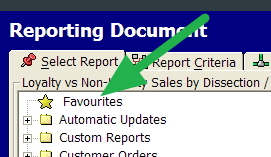
So here is a tip, organise the reports you want in your favourite folder, these are all the reports that you want to run regularly so you can find them when you require.


Point of Sale Software favourite reports


All you have to do is right-click on the reports, then this will put it in your Favourites Section.

Soon all your favourite reports are there one page, so there is no more going from a screen to another screen as all your favourite reports are in one convenient place!

It is easy then to add more reports or take out a report that you no longer need (just right click on the report in favourite and then click remove).

Using our software you have a unique ability to quickly design a smart list just for yourselves of reports so allowing you to increase your overall productivity.


Add new comment

Restricted HTML

  • Allowed HTML tags: <a href hreflang> <em> <strong> <cite> <blockquote cite> <code> <ul type> <ol start type> <li> <dl> <dt> <dd> <h2 id> <h3 id> <h4 id> <h5 id> <h6 id>
  • Lines and paragraphs break automatically.
  • Web page addresses and email addresses turn into links automatically.
CAPTCHA This question is for testing whether or not you are a human visitor and to prevent automated spam submissions. Image CAPTCHA
Enter the characters shown in the image.

Rental of point of sale software

POS SOFTWARE

Rent vs buy

There are several tax and management advantages to renting rather than leasing a POS system.  Overall the costs are in my experience, a bit dearer with the rental. 

Generally, these rentals are done for a four year period. At the conclusion of the agreement, you have the following options

1) Return the system to us which we accept as long as it is in good working order.

2) Purchase the POS system at a fair market rate. This is normally agreed at the start of the rental. 

3) Continue with the rental on a month to month basis which is a very popular option particularly if you are unsure of what is going to happen soon in the business.


Add new comment

Restricted HTML

  • Allowed HTML tags: <a href hreflang> <em> <strong> <cite> <blockquote cite> <code> <ul type> <ol start type> <li> <dl> <dt> <dd> <h2 id> <h3 id> <h4 id> <h5 id> <h6 id>
  • Lines and paragraphs break automatically.
  • Web page addresses and email addresses turn into links automatically.
CAPTCHA This question is for testing whether or not you are a human visitor and to prevent automated spam submissions. Image CAPTCHA
Enter the characters shown in the image.

Software support cost

POS SOFTWARE

Image removed.

This is to clarify that there will be *NO* increase in software fees to our clients despite what we have all seen that all our competitors have this financial year increased their software support fees, some quite dramatically, way beyond what I think is fair especially if you consider that many of them raised their prices last year too.  Based on some of the software agreements, I have seen their users are now paying 50% to 100% more than our users. If you have any of their software agreements, we are happy to supply a competitive quote.

As announced at the start of this year, despite that we have *NOT* increased these fees for many years, we have no plans to raise them. 


Add new comment

Restricted HTML

  • Allowed HTML tags: <a href hreflang> <em> <strong> <cite> <blockquote cite> <code> <ul type> <ol start type> <li> <dl> <dt> <dd> <h2 id> <h3 id> <h4 id> <h5 id> <h6 id>
  • Lines and paragraphs break automatically.
  • Web page addresses and email addresses turn into links automatically.
CAPTCHA This question is for testing whether or not you are a human visitor and to prevent automated spam submissions. Image CAPTCHA
Enter the characters shown in the image.

Holidays - who's minding the store?

POS SOFTWARE

Holidays

You are planning a holiday. It going to be a great time.

Fair enough everyone needs to get their batteries recharged and stepping away for a week or two is I think a necessity. If you are like me, you need a week of holidays just to unwind enough to start enjoying the holidays. You start making plans, counting the days 

But hang on a minute...

Have you prepared the shop for your absence? Who is in charge while you are gone? Does everyone know what they are supposed to do while you are gone?

Of most importance to us, do they know how to work the computer system? If they do not, do you have support available while they are gone? 

Test runs

What I recommend is that you do some test runs, organise the shop, take a couple of days off and then see what happens.  


Add new comment

Restricted HTML

  • Allowed HTML tags: <a href hreflang> <em> <strong> <cite> <blockquote cite> <code> <ul type> <ol start type> <li> <dl> <dt> <dd> <h2 id> <h3 id> <h4 id> <h5 id> <h6 id>
  • Lines and paragraphs break automatically.
  • Web page addresses and email addresses turn into links automatically.
CAPTCHA This question is for testing whether or not you are a human visitor and to prevent automated spam submissions. Image CAPTCHA
Enter the characters shown in the image.

Aldi slams loyalty programs

POS SOFTWARE

Image removed.

Aldi, here has made an extraordinary attack, on Coles and Woolworths, claiming that they are not worth chasing.  They have made a calculator to show how small the benefits of these people's rewards program.

I think they are right.

However what the article goes on further to say is that "60 per cent of Australians saying it influences where they shop and 36 per cent of people admitting they spend more because of the schemes" so for such small rewards people are being influenced.

To me what it says is that your loyalty program offering does not have to be much to get decent results and there is no denying that it does have an effect.

Add new comment

Restricted HTML

  • Allowed HTML tags: <a href hreflang> <em> <strong> <cite> <blockquote cite> <code> <ul type> <ol start type> <li> <dl> <dt> <dd> <h2 id> <h3 id> <h4 id> <h5 id> <h6 id>
  • Lines and paragraphs break automatically.
  • Web page addresses and email addresses turn into links automatically.
CAPTCHA This question is for testing whether or not you are a human visitor and to prevent automated spam submissions. Image CAPTCHA
Enter the characters shown in the image.

Heavy items

POS SOFTWARE

In your shop, what is strongly suggested all things being equal that you keep heavy goods on or near the floor! Although there is no limit as such, as a general guide anything over 45 kgs needs to be looked at ASAP.

But that’s just the tip of the iceberg

Legally a heavy item depends, on many factors eg if the item is wet or slippery if the items are stored in a cramped area so that people had to assume awkward positions to lift them etc. Here is a guide for retail {Link removed} that explains much of it from a legal point of view.


The other issue is forgetting the legal problems, do you really want anyone to get hurt?   Everyone is trying to do the right thing here.

So what can you do about it?

So once you have identified the heavy stock, move them to safe areas.

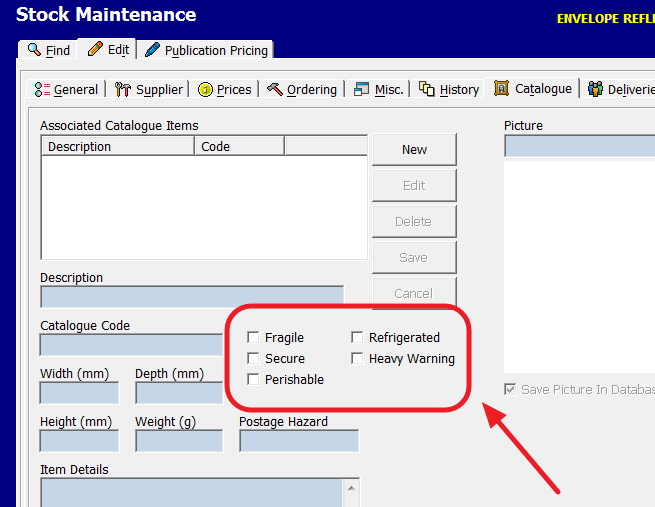
What I further recommend is that you mark in your software these items so that people will just by looking at the item on the screen know that they are potentially looking at a lifting problem and these items require special handling.

You’d do it like this:

Go to stock maintenance in your point of sale software -> Edit marked them as in the red box.


Just another example of how our software has useful items that you can use.


Add new comment

Restricted HTML

  • Allowed HTML tags: <a href hreflang> <em> <strong> <cite> <blockquote cite> <code> <ul type> <ol start type> <li> <dl> <dt> <dd> <h2 id> <h3 id> <h4 id> <h5 id> <h6 id>
  • Lines and paragraphs break automatically.
  • Web page addresses and email addresses turn into links automatically.
CAPTCHA This question is for testing whether or not you are a human visitor and to prevent automated spam submissions. Image CAPTCHA
Enter the characters shown in the image.