
Boost Your Shop using Bing Places for Business
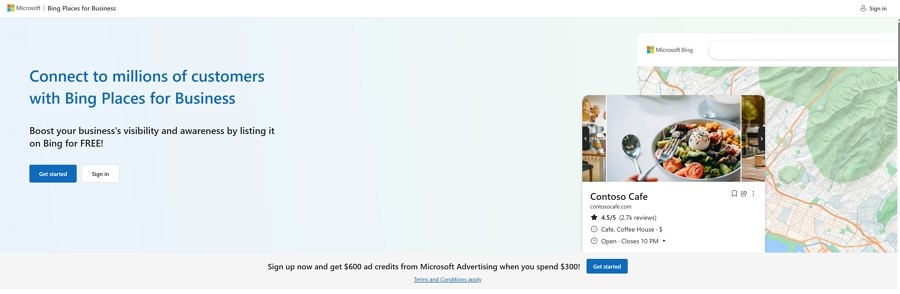
We all know Google is the big player in search engines. Many retailers spend time worrying about their Google ranking. I have seen large shops have an SEO person to make sure it goes well. But if you ignore Bing Places for Business, you are missing out on customers.
In 2025, setting up your shop on Bing is not just "nice to have." It is a smart move to grow your business. Does it cost you NO!
According to Microsoft data, about 17 million people in Australia use its search network each month.
Here is a secret many retailers miss: many of these users are at work, where their work computers have Bing set as the default search engine. Its windows default and these people search during the workday, this is when most people buy. These people have money.
If your shop isn't on Bing, you are invisible to them.
Why You Should Care About Bing
A potential customer asks their computer, "Where can I find a gift shop near me?" Are you there in the answer?
If your business isn't listed correctly on Bing, the computer will recommend someone else, since the AI won't know you exist.
You want your shop to be the answer.
The good news? You can get this sorted in 5 minutes.
How to Set Up Your Profile Quickly
You don't need to be a wizard, as there is a shortcut that saves you heaps of time.
If you already have a Google Business Profile, and you should have, if not, see how to set one up.
Now, once you have a Google Business Profile, you can copy all that information straight over to Bing. Here is how you do it:
Go to the Bing Places Website:
Head over to bing.com/forbusiness. You will need a Microsoft account (like Outlook or Hotmail) to sign in.
Claim Your Business:
Search for your shop's name. If you see it, click "Claim this business." If you don't see it, click "Add new business."
Use the Import Tool:
This is the best part. Choose the option to "Import from Google Business Profile." This pulls in your address, hours, and photos instantly.
Check Your Details:
Look closely at your Name, Address, and Phone number. It must be 100% correct. If it's not, you could miss out on customers.
Write a Good Description:
Tell people what you do. Use simple words that customers search for. For example: "Your local newsagency for books and gifts. Find us inside Albert Village Shopping Centre, right near Woolworths."
Pick Your Categories:
Don't just pick "Retail." Be specific. Here, for example, I would select "Book Shop," "Greeting Card Shop," or "Stationery Supplier." This helps the right people find you.
If you are unsure what to write here, use your sales reports in your POS Software.
Then put in a simple words customers search eg "gluten-free bakery," "men's work boots" or "dog toys."
Add Photos:
Good ones, pictures sell products. Upload bright, clear photos of your best displays, here is how to take photos for your business
Make sure that your top-selling item in a department is listed.
Don't Make These Common Mistakes
I have seen many shop owners make small errors that cost them sales. Watch out for these traps:
The verification process.
Although "Import from Google" is fast, sometimes you will find that Microsoft will require a manual postcard/phone verification, if so do not give up, they are just trying to make sure the information is accurate and what you say is true. Fill it out. Then keep an eye out, as sometimes it gets lost in their system.
Wrong Opening Hours:
A potential customer can get angry after driving to your shop only to find the doors locked, even though the profile said you were open; you may also get a negative review. Constantly update your hours for public holidays.
Bad Map position:
If you are in a big shopping centre, make sure the location is correct at your front door. Sometimes they are way off. This helps people find you easily. What is the point of telling people all this information if they cannot find your shop?
How to Get even More Customers Through the Door
Once your profile is set up, you can use a few tricks to get more attention.
Post Special Deals:
Bing lets you post "Deals" right on your listing. You could offer "20% off all magazines" or a special bundle price. This grabs attention quickly.
I think Bing's "Deals" feature is more prominent and easier to use than Google's.
Reply to Reviews:
It is very important to ask your regulars to leave a review. Always thank them. If a customer leaves a negative review, respond politely to resolve the issue. This demonstrates that you care.
Conclusion
Fixing your Bing Places for Business profile is an easy win. It doesn't cost money, and it takes minimal effort. Probably about 5 minutes.
Make sure your details are correct, that your profile looks good, millions of Australian shoppers use Bing and Microsoft tools and don't leave those sales on the table.
[Claim Your Free Bing Places Listing Now]
Update: This article had to be rewritten as Bing procedures changes recently
Written by:

Bernard Zimmermann is the founding director of POS Solutions, a leading point-of-sale system company with 45 years of industry experience, now retired and seeking new opportunities. He consults with various organisations, from small businesses to large retailers and government institutions. Bernard is passionate about helping companies optimise their operations through innovative POS technology and enabling seamless customer experiences through effective software solutions.