Point of Sale Software

Here are some Articles from the Blog Subject - Barcode scanners -

Bad barcodes will cost you money without you even knowing it?

POS SOFTWARE

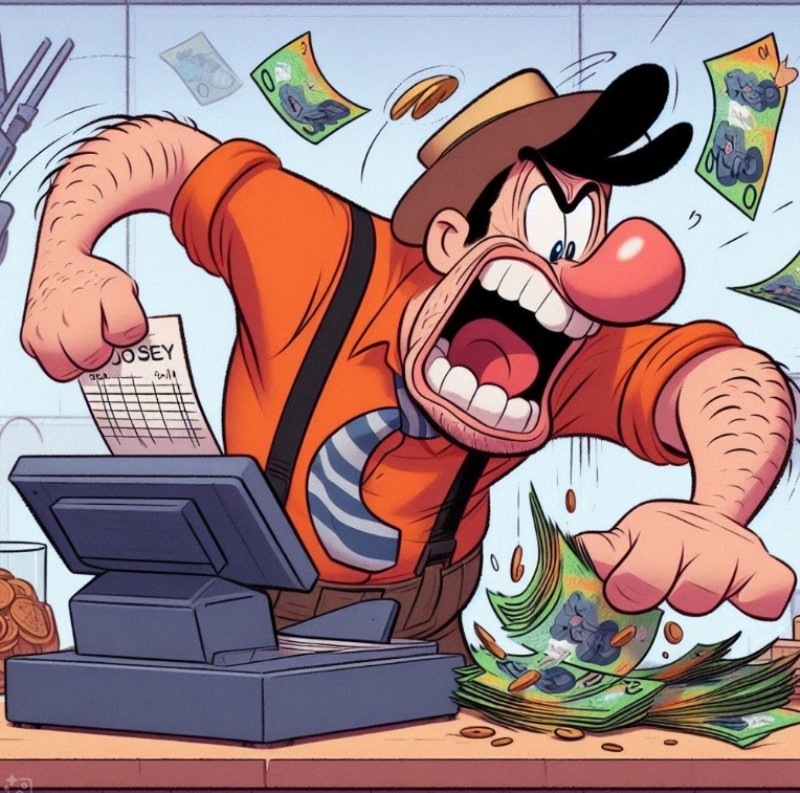
Cashier upset

Why is the POS scan rate important?

Your cashiers must process transactions quickly and accurately. This keeps lanes moving. Bad barcodes slow checkouts and frustrate family shoppers buying magazines, books, gifts, or greeting cards. What we need to do is boost POS Software scan rates.

We have a unique KPI specially designed for this, %Scan. This KPI metric measures the percentage of retail barcode scans versus manually keyed entries. Using it will improve retail checkout efficiency.

How to Check Your POS Scan Rate

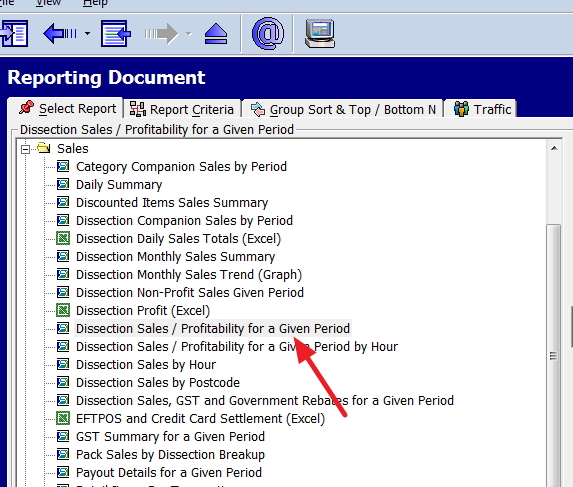
Go to the cash register reports

> Select Sales,

> Then "Dissection Sales/Profitability for a Given Period."


Set it for the past three months (or 12 for trends) and run the report.


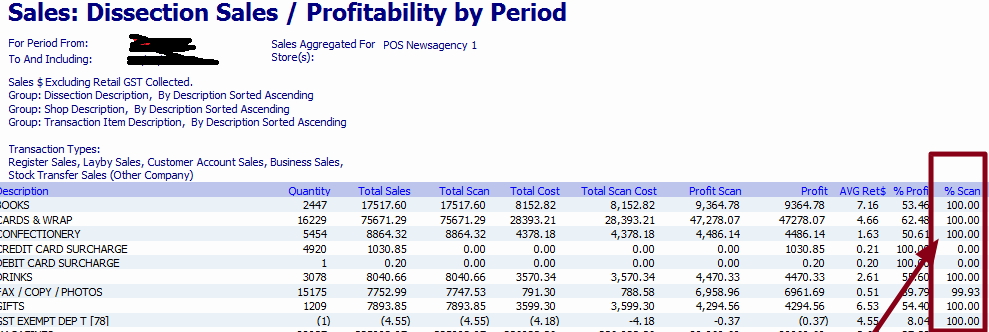
You will get a report that looks like this one. Now, look at the last row marked.

Now run down the list.

You are looking for dissections with high quantities and low scan rates, as these are the big problems here.

Now, examine the %Scan column in the last row or breakdown. Look at the Total Scan. If you are doing a lot of scans and your %Scan rate is low, you have a problem. You need a higher %Scan to deliver quicker transactions and shorter queues in your shop, and it also gives you more accurate inventory data. Besides, it is a pain for staff, as it reduces manual entry errors (Industry figures indicate about one error per 300 characters in manual entry for cashiers).

How to improve the POS scan rate?

To improve POS efficiency, start here:

Test scanners

First, for reliable performance, we often find that when we examine the %Scan, the problem lies with the scanner. If so, clean the scanner lenses and adjust angles. Consider it part of your POS system troubleshooting.

Avoid glare or shiny surfaces.

The problem sometimes is that the objects you are scanning are bright, which causes glare. I have noticed this often happens with frosty drinks and plastic covers on greeting cards. You need to be careful here.

Audit barcodes

Ensure that barcodes are clear on products. If they are real problems, talk to the suppliers, as poor barcode quality leads to unscannable items, forcing manual transaction entries that slow checkout lines and increase human errors, causing lost sales and customer frustration. In the worst case, consider printing in-house barcodes for these products.

Standardise barcode placement

Often, the cashier cannot find the barcode. In your shop, make a policy that all in-house barcodes should be in the same place, eg on the top left, at the rear middle, etc. It does not matter where; just be consistent. I prefer the bottom rear over the front; it covers some of the product.

Conclusion

Run your POS scan rate report now to spot low-scanning categories to check out your speed retail.

Then monitor %Scan trends. Just because you get it right now does not mean a problem will start to appear soon.

Written by:

Bernard Zimmermann


Bernard Zimmermann is the founding director of POS Solutions, a leading point-of-sale system company with 45 years of industry experience, now retired and seeking new opportunities. He consults with various organisations, from small businesses to large retailers and government institutions. Bernard is passionate about helping companies optimise their operations through innovative POS technology and enabling seamless customer experiences through effective software solutions.



Add new comment

Restricted HTML

  • Allowed HTML tags: <a href hreflang> <em> <strong> <cite> <blockquote cite> <code> <ul type> <ol start type> <li> <dl> <dt> <dd> <h2 id> <h3 id> <h4 id> <h5 id> <h6 id>
  • Lines and paragraphs break automatically.
  • Web page addresses and email addresses turn into links automatically.
CAPTCHA This question is for testing whether or not you are a human visitor and to prevent automated spam submissions. Image CAPTCHA
Enter the characters shown in the image.

Barcodes against a QR Code

POS SOFTWARE

As Australian retailers modernise their operations, we strongly suggest you replace your barcode readers with 2D scanners that read QR codes. Upgrading to QR code readers, though with a minor hardware cost increase, provides notable benefits in data capacity, efficiency, and customer engagement, offering high ROI.

Enhanced Data Capacity and Versatility

The most significant advantage of QR codes is their superior data storage capacity. A standard barcode is sufficient only for a price or basic product code. In contrast, a QR code can hold over 4,200 alphanumeric characters. It contains a lot of text information that suppliers can use to store product specifications. We use it too for weighing items for the POS Systems.

Improved Scanning, Efficiency and Reliability

QR codes are engineered for superior performance in a fast-paced retail environment. Unlike traditional barcodes that need scanning in a straight line, two-dimensional QR codes can be read from any angle, so you don't have to line them up as much, which speeds up barcode reading significantly.

What I like about QR codes in particular is their better error-correction capability. I have seen them scanned even when the QR code is badly damaged, dirty, or obscured.

Streamlined Operations and Inventory Management

Because it has better error correction, it is much faster. There are far fewer attempts to read the barcode.

Industry pressure

QR codes are entering the market; we are now seeing products without barcodes, only with QR codes. If you want to handle such products, you need a scanner that reads QR codes, or you need to stick a barcode on each product.

Loyalty programs

Our CRM can use QR codes. Many suppliers also use a QR code for the same reason. 

Accessibility

QR codes are inherently accessible because suppliers favour them, as smartphones can easily scan them.

By adopting QR code readers, you are future-proofing your business.

Written by:

Bernard Zimmermann


Bernard Zimmermann is the founding director of POS Solutions, a leading point-of-sale system company with 45 years of industry experience, now retired and seeking new opportunities. He consults with various organisations, from small businesses to large retailers and government institutions. Bernard is passionate about helping companies optimise their operations through innovative POS technology and enabling seamless customer experiences through effective software solutions.
 
 
I love the picture above by Dominique Mariez.

Add new comment

Restricted HTML

  • Allowed HTML tags: <a href hreflang> <em> <strong> <cite> <blockquote cite> <code> <ul type> <ol start type> <li> <dl> <dt> <dd> <h2 id> <h3 id> <h4 id> <h5 id> <h6 id>
  • Lines and paragraphs break automatically.
  • Web page addresses and email addresses turn into links automatically.
CAPTCHA This question is for testing whether or not you are a human visitor and to prevent automated spam submissions. Image CAPTCHA
Enter the characters shown in the image.

Magellan 1500i scanner

POS SOFTWARE

 Magellan 1500i Scanner

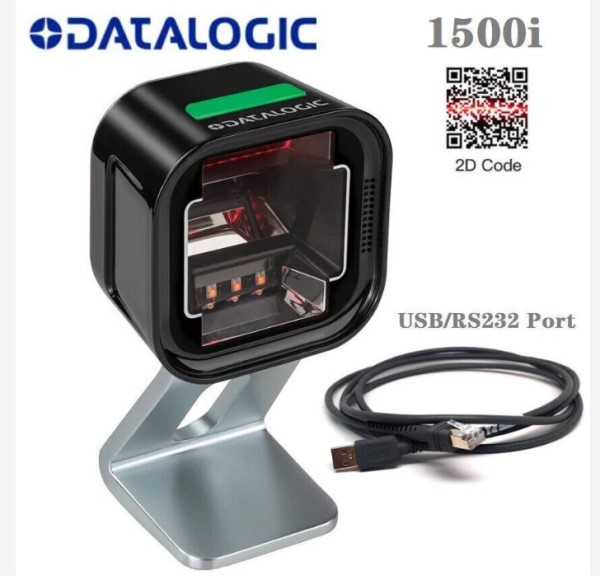
We like this Magellan 1500i scanner, which has transformed our clients' checkout experience.

The Perfect Blend of Power and Practicality

Your retail barcode scanner needs are becoming more complex. The magellan 1500 offers versatile scanning capabilities in a compact, stylish package that won't crowd your counter space.

Advanced Features That Make a Difference

The POS scanner system

It uses digital imaging technology, which, in practice, we have seen handle everything from traditional barcodes to digital loyalty cards and mobile coupons so that it can read codes up to 25 centimetres away.

Smart lights

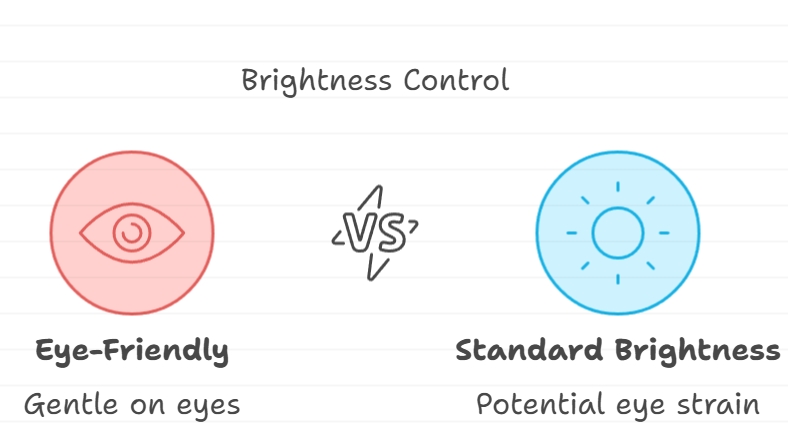
What makes this datalogic magellan 1500i special is its unique lights that adjust themselves - like how your phone screen gets brighter or dimmer depending on where you are. The plus is the scanner can keep working while being gentle on the eyes, which is essential when working at a shop counter for a long time. Think of it like having a clever desk lamp that knows exactly how bright it needs to be - not too bright to hurt your eyes, but bright enough to do the job well.

Versatility in Action

It can automatically switch between hands-free and handheld modes. When you pick it up, it activates an LED aimer and uses 'Green Spot' technology to confirm successful scans.

Aesthetics

It is available in black or white, complementing a shop counter.

Size

Its small footprint makes it particularly valuable for shops with premium counter space.

Built to Last

I like that it is built to withstand drops. It was tested on repeated drops of 1.2 metres onto concrete. Unfortunately, we see this drop far too often in shops, particularly in handheld mode.

Why Consider Upgrading?

If you need a new scanner, I recommend this one.

Details are here

Add new comment

Restricted HTML

  • Allowed HTML tags: <a href hreflang> <em> <strong> <cite> <blockquote cite> <code> <ul type> <ol start type> <li> <dl> <dt> <dd> <h2 id> <h3 id> <h4 id> <h5 id> <h6 id>
  • Lines and paragraphs break automatically.
  • Web page addresses and email addresses turn into links automatically.
CAPTCHA This question is for testing whether or not you are a human visitor and to prevent automated spam submissions. Image CAPTCHA
Enter the characters shown in the image.

Barcode now has its 50th Birthday!

POS SOFTWARE

Can you imagine a world where every purchase involves manually entering the department and the price of every item at the checkout? Such a scenario might appear to have been lifted from a 1980s video game, but it was a fact for retailers then. Then came the barcode.

Fifty years ago today, on June 26, 1974, the first commercial barcode scanning was done on a Wrigley's chewing gum pack. Those stripes may seem simple, but they revolutionised how we shop!

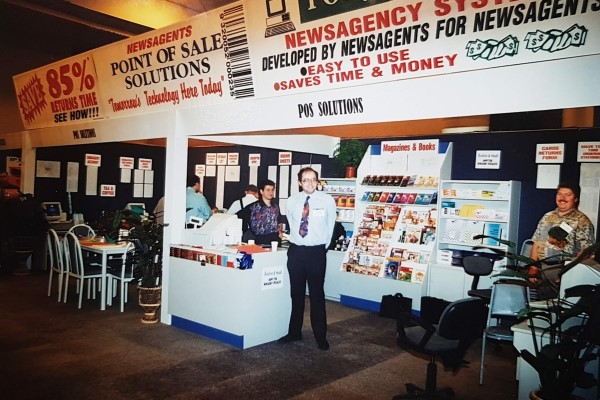
After the barcodes were released, we released the first magazine barcoded return system here. At first, because it was so new, we had to manually put on a barcode sticker as many magazines did not have barcodes.

I am in the middle, boy. I was proud that day as no-one had ever done anything like this before, and next to me was Joe, the programmer who did most of the analysis for the returns. We had a deal between us; I handled the newsagency stuff and the data handling, and he dealt with the magazines. It was in DOS. The result is that we saved our clients a lot of time and money.

How the Barcode Changed Retail (and Saved Money!)

Before barcodes, cashiers rang up sales by manually entering in price and department codes. This process was slow and error-prone, frustrating customers and costing retailers money. The barcode, however, changed everything. Here's how:

  • Faster Checkouts and Happy Customers: A simple scan eliminates the need for manual code entry, resulting in shorter queues, happier customers, and improved staff productivity.
  • Reduced Errors and Happy Staff: Barcodes are much more accurate than manual code entry, leading to fewer mistakes and happier staff (no more hunting for the correct code!).
  • Improved Inventory Management and Reduced Costs: Barcodes allow retailers to track stock levels more efficiently. This means there's less chance of running out of popular items, less money tied up in unnecessary stock, and better-informed ordering decisions—all contributing to significant cost savings.
  • Enhanced Customer Experience: Beyond speed, barcodes enable features like price verification at checkout, reducing customer confusion.

The Barcode and Modern POS Systems: A Powerful Partnership

The barcode laid the foundation for modern POS systems like the ones we offer at POS Solutions. Here's how they work together to streamline your operations further:

  • Product Data at Your Fingertips: When you scan a barcode, the POS system instantly retrieves the product information, including its name, price, and the applicable GST Code.
  • Automatic Inventory Updates: Each scan automatically updates your inventory levels in real time, ensuring you always have accurate stock data and can make informed decisions about reordering.
  • Sales Tracking and Informed Decisions: POS systems use barcode data to track sales trends and identify popular items. This information helps you decide stock levels, promotions, and future ordering.
  • Seamless Integration for a Smooth Experience: Modern POS systems seamlessly integrate with barcode scanners, creating a smooth and efficient checkout experience for you and your customers.

Next Step of the Retail Industry

The introduction of a barcode, no doubt, has been a breakthrough, but the technology is still developing. We at POS Solutions are very optimistic about the future of retail efficiency, involving the following, which we are introducing:

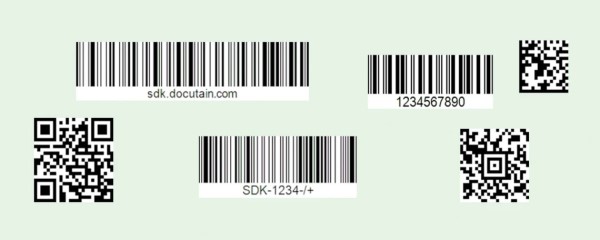
common 1D & 2D barcode formats

  • 2D Barcodes: These data-rich barcodes can hold more information than traditional barcodes, potentially including product descriptions, origin details, and even expiry dates.
  • QR Codes: These square-shaped codes can be scanned using smartphones, opening up new possibilities for customer engagement and product information access.
  • RFID Tags: These tiny radio frequency chips offer even greater tracking capabilities and can be used for tasks like automated inventory management.

These advancements can inspire, but the barcode is essential in the retail ecosystem. Remarkably, this solution made the most significant difference in modern retail.

Ready to leverage the power of barcodes and modern POS systems for a more efficient and profitable future? Contact POS Solutions today to learn more about our innovative solutions!

Add new comment

Restricted HTML

  • Allowed HTML tags: <a href hreflang> <em> <strong> <cite> <blockquote cite> <code> <ul type> <ol start type> <li> <dl> <dt> <dd> <h2 id> <h3 id> <h4 id> <h5 id> <h6 id>
  • Lines and paragraphs break automatically.
  • Web page addresses and email addresses turn into links automatically.
CAPTCHA This question is for testing whether or not you are a human visitor and to prevent automated spam submissions. Image CAPTCHA
Enter the characters shown in the image.

Should you use long range retail scanners?

POS SOFTWARE

scanning with long-range scanners

Boost Checkout Speed & Customer Satisfaction: Long-Range Scanners

In today's high-speed retail world, conventional checkout processes are often slowed by the need to scan cumbersome items. That is where long-range retail scanners are the unique advantage for a small, physical business hoping to fire up its tasks and further develop client experience.

Why Long-Range Scanners Matter

Imagine a scenario where your cashier no longer needs to leave the register to scan items and struggle with heavy, cumbersome products. We say that the cost of one worker's comp case would be more than pay for a long-range scanner.  Long-range scanners eliminate these pain points, offering several key advantages:

Increased Efficiency

By extending the scanning range, these scanners allow for quicker and more seamless checkout processes. No more awkward reaching or handling customers' mobile devices – point and scan from a distance.

Improve checkout speed

We all know that a long wait can be a deterrent for shoppers. So, we have found that long-range scanners have helped speed up transactions and reduce queue times, improving customer satisfaction.

Versatility

Whether dealing with large appliances, bulky furniture, or items tucked away on high shelves, long-range scanners have you covered. Their extended reach ensures no barcode is left unscanned.

Determining Your Scanner Requirements

Before investing in long-range scanners, assessing your specific needs is crucial. Here are some key considerations:

  1. Location Assessment: Measure the distance from your checkout counter to the farthest potential barcode location. Add some extra to this measurement to account to give you some leeway and for future growth.

  2. Environmental Factors: Evaluate your retail environment. Will the scanners be used indoors or outdoors? Are there obstacles like shelves or displays that could obstruct the scanning path? What are the lighting conditions like?

  3. Barcode Types: You need to check what types of barcodes you have in your shop. Most will be 1D barcodes, but we are seeing more 2D codes coming in. I am sure you will see many more 2D barcodes in 10 years. Many of our clients using scales, need 2D barcodes now.

  4. Scanner Technology: There are several popular scanner systems now, and in my experience, there is often little between them. We do tend to get a longer life out of the laser scanners, so all equal, I would go with a laser.

 Weighing the Cost-Benefit Ratio

I would suggest if you need a new barcode scanner, make sure it is long-range as its extra cost is not that much. Its slightly higher cost will more than be made up by the potential time saved and the potential worker comp problems of people having to lift heavy objects. It will also have a positive impact on customer satisfaction.

Implementation and Integration

Proper implementation and integration are crucial once you've selected the suitable long-range scanners for your business. Invest in comprehensive employee training to ensure seamless adoption and optimal scanner usage. Additionally, consider the impact on your inventory management processes and plan for potential integration with other technologies like RFID or computer vision systems.

Future-Proofing Your Investment

A scanner will last a long time and over that time your scanning needs will change. When choosing long-range scanners, consider choices with flexible or stretched-out range capacities to confirm your shop in the future. This will ensure your scanners can adapt to any changes in your retail operations without needing immediate replacements.

Conclusion

In the retail scene today, people need to look for ways of upgrading their systems to improve their client experience. Long-range retail scanners offer a good method to speed up the checkout processes, further develop effectiveness, and make a more helpful shopping experience for your clients. Consider them to develop your retail shop. 
 

If you want more information, we are here to help.
 

Add new comment

Restricted HTML

  • Allowed HTML tags: <a href hreflang> <em> <strong> <cite> <blockquote cite> <code> <ul type> <ol start type> <li> <dl> <dt> <dd> <h2 id> <h3 id> <h4 id> <h5 id> <h6 id>
  • Lines and paragraphs break automatically.
  • Web page addresses and email addresses turn into links automatically.
CAPTCHA This question is for testing whether or not you are a human visitor and to prevent automated spam submissions. Image CAPTCHA
Enter the characters shown in the image.

The changing world of barcode scanners

POS SOFTWARE

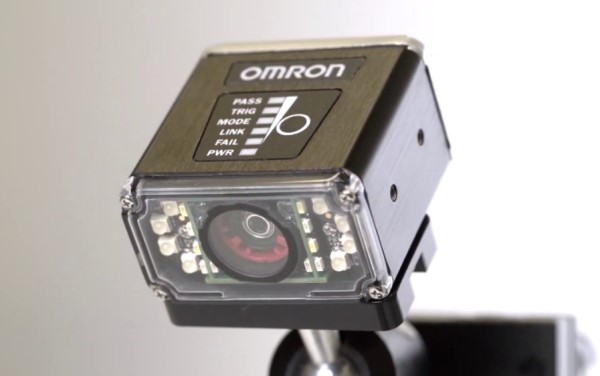
One camera for all barcoding needs


Barcode scanners today are incredible in speed and accuracy. On average, we calculate that manually entered data has a 1% error rate. Barcode scanning cuts that down to 1 error in 10 million scans! This translates to massive time and money savings for retailers.

But did you know your old barcode scanner could be costing you customers?  

In this guide, I will discuss the pros and cons of the existing CCD and laser scanners vs. the newer camera scanners, which will soon be available in bulk, so you can make the best choice for your store's needs.

Before I start, I should say that the camera scanners are really CCD scanners on steroids. They are like giving an old CCD scanner a superhero upgrade! They can read virtually any barcode, no matter how blurry or beaten up, and even scan stuff right off a phone.

The Barcode Scanner Basics

Let's start with the two main existing categories:

  • Tried-and-True: Laser and CCD Scanners These have been around for ages, and with good reason. They're specialised tools that excel in certain areas:

    • Laser Scanners

      • Lightning-fast, super accurate, and can handle even crummy barcodes.
      • Many models scan from a distance, which is great for heavy items.
    • CCD Scanners

      • They're more budget-friendly
      • Generally better than laser scanners for close-up scanning of good-quality barcodes.
      • They often have trouble reading damaged labels or wet items like a Coca-Cola bottle directly from the fridge.

Since they're both small, they are great for stores with limited counter space.

Most have trouble reading barcodes on phone screens,

They are designed to work with the basic 1D barcodes. Soon, we are expecting that some products will switch from 1D barcodes to more complex barcodes. When this happens in bulk will be when the problems come. 

  • Camera-Based Scanners 

    • These can read virtually any barcode (1D, 2D, QR codes, etc.) easily 
    • Scanning from phone screens is good.
    • Can be used with self-checkout, mobile coupons, and inventory checks with a simple photo snap.
    • Higher upfront cost
    • Often slower
    • Often have issues in low-light situations
    • Need more training to get used to them.
    • It's still pretty experimental; most shops that use them only use them for some types of scanning.

Scanner Showdown: Which Model is Right for You?

Here is my breakdown to help you decide:

  • Volume is King: If you have a busy store, laser is the fastest.
  • Going Digital: Want customers to use mobile coupons, streamline returns, or consider self-checkout? Camera-based is the only way to unlock these customer-pleasing features.
  • Budget Matters: Tight on budget? CCD is the cheapest way to go. 
  • The future: Camera-based tech, as it keeps evolving, will replace CCD and laser, but not anytime soon. 
  • Omnichannel or Not: Camera scanners can now do everything, while CCD and laser scanners generally cannot. 

The Bottom Line: It's All About Your Needs

Only get camera scanners if you have a need that CCD and lasers cannot do.

Chat with us, your point-of-sale (POS) provider, and we can tailor a solution just for you!

Ready to take your small business to the next level? Ask us for the best scanner options for your shop – your customers (and your bottom line!) will thank you.

Comments

The future is in Camera-Based Scanners but not yet

Add new comment

Restricted HTML

  • Allowed HTML tags: <a href hreflang> <em> <strong> <cite> <blockquote cite> <code> <ul type> <ol start type> <li> <dl> <dt> <dd> <h2 id> <h3 id> <h4 id> <h5 id> <h6 id>
  • Lines and paragraphs break automatically.
  • Web page addresses and email addresses turn into links automatically.
CAPTCHA This question is for testing whether or not you are a human visitor and to prevent automated spam submissions. Image CAPTCHA
Enter the characters shown in the image.

Choosing the Right Barcode Scanner for Your Business

POS SOFTWARE

Choosing the Right Barcode Scanner for Your Business

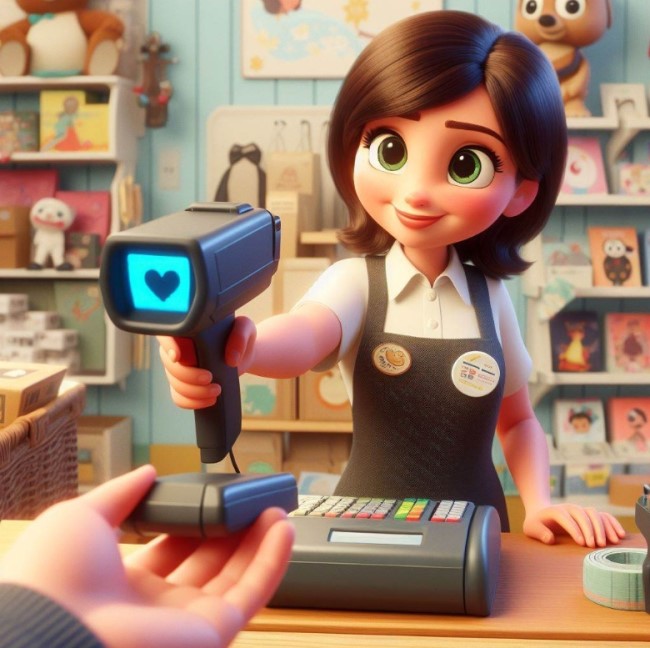
Shop attendant using a barcode scanner

Today, businesses need to scan barcodes on products and so use barcode scanners. 

The most common barcode scanners in retail today are laser and CCD scanners.

Laser scanners:

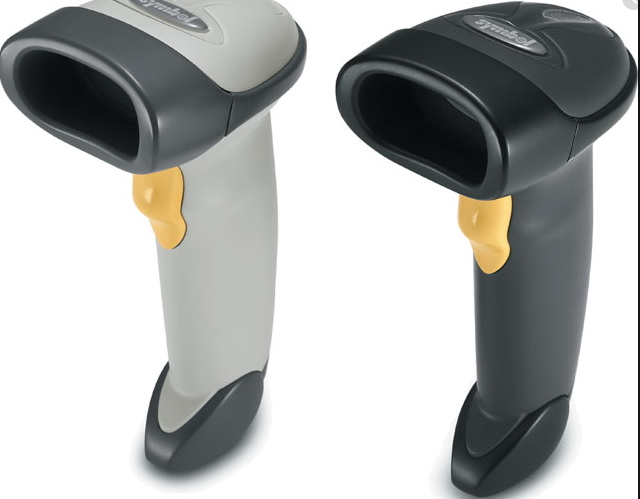
Hand held scanners

The most popular are laser scanners as the price for these has dropped

Pros:

> They are better at reading problematic barcodes, e.g. on a soft drink that can be wet, curved and has glossy surfaces.

> Their range is good, which makes it often easier to scan.

> They scanned barcodes which is excellent in high-volume settings.

Cons:

> They tend to be more costly, which may be problematic if you have a tight budget.

> They have moving parts that make them prone to damage.

> Although we have never had a problem, lasers are classed as a public safety risk. They could be dangerous if misused; they reflect onto someone's eye.

CCD scanner:

Pros:

> CCD scanners are generally cheaper than laser scanners

> In close range, they tend to be more accurate

> Since they do not have any moving parts, they typically last longer and are less damage-prone.

Cons:

> Range, and this is no minor point. CCD scanners can, in many applications, be a pain as you have to get the scanner quite close to read the barcode.

> Difficult-to-read barcodes such as magazines or reflective gifts can be a problem.

Conclusion

The choice between laser and CCD scanners depends on your business's specific needs.

In today's world, the same brand will have different factories for different types, so the brands matter less today. Unlike many, we test our scanners. We have them on many sites, so we know how they fare in the real world. We can help you make a smart investment for your business. Whether you need a laser scanner for its range or a CCD scanner for its accuracy, we've got you covered.

Add new comment

Restricted HTML

  • Allowed HTML tags: <a href hreflang> <em> <strong> <cite> <blockquote cite> <code> <ul type> <ol start type> <li> <dl> <dt> <dd> <h2 id> <h3 id> <h4 id> <h5 id> <h6 id>
  • Lines and paragraphs break automatically.
  • Web page addresses and email addresses turn into links automatically.
CAPTCHA This question is for testing whether or not you are a human visitor and to prevent automated spam submissions. Image CAPTCHA
Enter the characters shown in the image.