Point of Sale Software

Here are some Articles from the Blog Subject - Cash Registers -

Integrating video surveillance and the POS system
POS SOFTWARE

Integrating video surveillance into your POS system


Integrating your video surveillance with the POS system makes a lot of sense. This example shows a skimmer being installed by some shop thieves. Your staff may not be involved in the fraud at the point of sale. This fraud took three (3) seconds. Nothing would show here on the computer if the cameras had never been installed on the tills; it would never have been found.

It took three seconds. On the footage, a thief leans over the till, slips a skimmer onto the terminal, and walks out of the shop. No alarm. No confrontation. If a camera hadn't been pointed at that till, nobody would ever have known it happened.

That clip says everything about why the point of sale is the most important place in your shop to put security cameras. The tills are where the cash is, and that's where most of the fraud happens. Which is exactly why integrating your video surveillance with the POS system makes so much sense.

Most fraud looks like a normal sale.

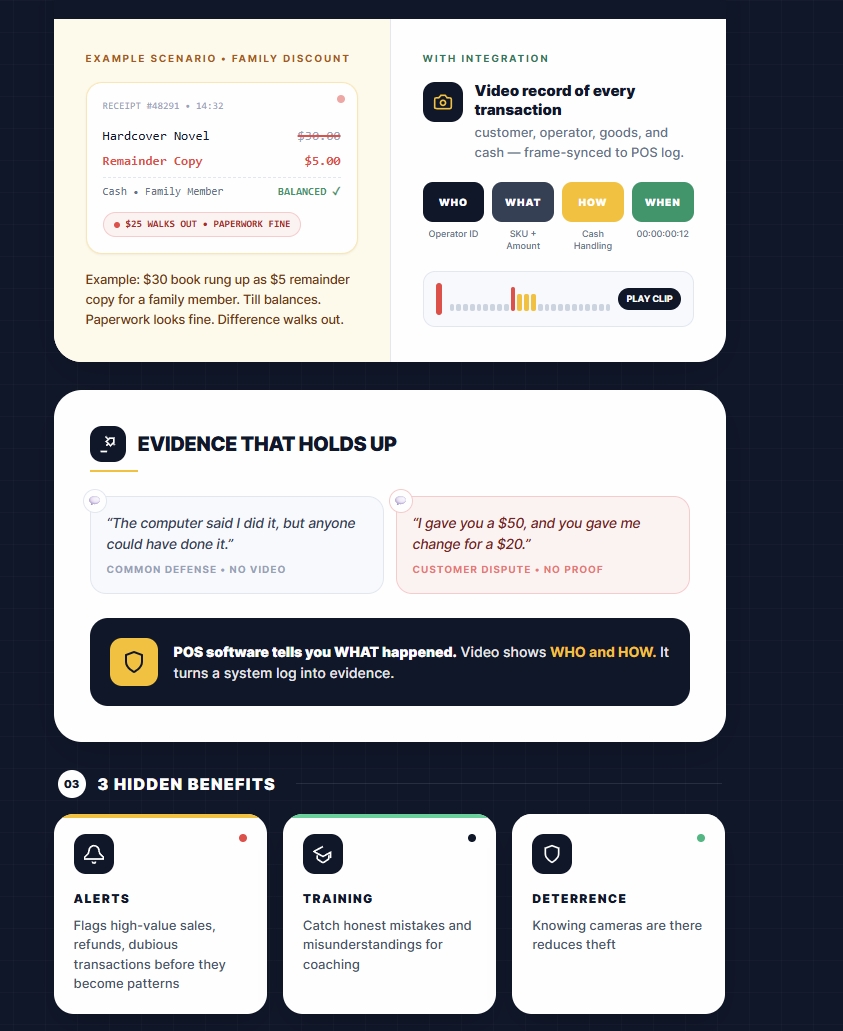
The skimmer case is an extreme example. Most POS fraud involves real transactions that are quietly manipulated. The classic pattern: a staff member's brother picks up a $30 book, and it gets rung up as a $5 remainder copy. The till balances, the paperwork looks fine, and the difference walks out the door.

With an integrated system, you have a video record of every transaction — the customer, the operator, the goods, and the cash. When the numbers don't add up, you're not left guessing.

Evidence that holds up

POS software alone tells you what happened in the system — not who did it, or how. That becomes a real problem the moment a dispute needs to be verified. Anyone who has dealt with these cases will recognise the lines you hear in court:

"The computer said I did it, but anyone could have done it."

"I gave you a $50, and you gave me change for a $20. Okay, the computer says $20, but I gave you a $50."

Video settles those arguments. It turns a system log into evidence.

Alerts, training, and deterrence

An integrated system doesn't just record — it flags. High-value sales, refunds, and other dubious transactions can trigger alerts, pointing you toward possible fraud before it becomes a pattern. And not everything you uncover will be fraud. Often, it's just common mistakes or misunderstandings that can be corrected with a little additional training.

Then there's the simplest benefit of all: just knowing the cameras are there has been shown to reduce theft in the first place.

Cameras alone aren't enough.

You may already have cameras over the tills. But if the video isn't integrated with the POS, every investigation means scrubbing through archived footage by date and time to find the transaction you need. It's slow, and it's a pain. Integration ties each transaction to its clip, so you go straight to the moment that matters.

Beyond the basics

Once your cameras are integrated, they can do more than record transactions. The same setup can support:

  • Facial recognition analytics to identify known individuals the moment they walk in.
  • People-counting analytics to make sure occupancy limits are never exceeded.
  • Demographic analysis to better understand who is shopping, and when.

The tills are where the cash is. Make sure they're also where the evidence is.


Written by:

Bernard Zimmermann


Bernard Zimmermann is the founding director of POS Solutions, a leading point-of-sale system company with 45 years of industry experience, now retired and seeking new opportunities. He consults with various organisations, from small businesses to large retailers and government institutions. Bernard is passionate about helping companies optimise their operations through innovative POS technology and enabling seamless customer experiences through effective software solutions.



Add new comment

Restricted HTML

  • Allowed HTML tags: <a href hreflang> <em> <strong> <cite> <blockquote cite> <code> <ul type> <ol start type> <li> <dl> <dt> <dd> <h2 id> <h3 id> <h4 id> <h5 id> <h6 id>
  • Lines and paragraphs break automatically.
  • Web page addresses and email addresses turn into links automatically.
CAPTCHA This question is for testing whether or not you are a human visitor and to prevent automated spam submissions. Image CAPTCHA
Enter the characters shown in the image.

Finding the Right Cash Box for Your Business

POS SOFTWARE

Sturdy cash box

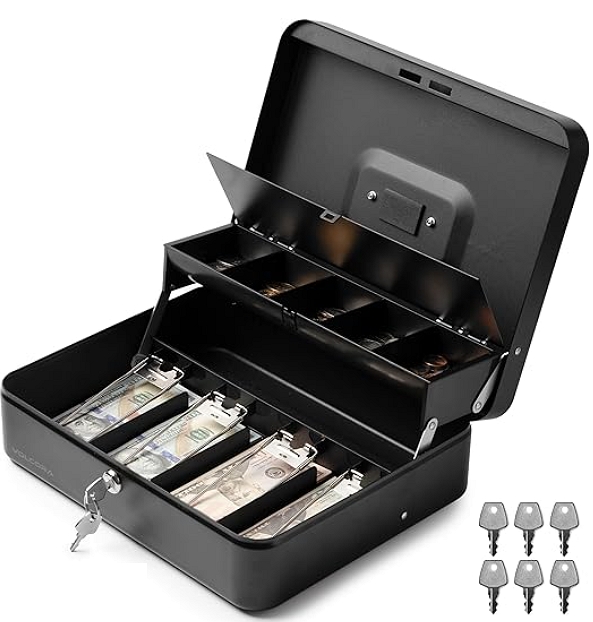
A cash box is a secure, portable container that keeps cash, coins, receipts, and small valuables safe, commonly used outside the shop. For a retailer, protecting the money is vital to their business operations. An efficient and secure cash management system helps you stay organised and minimise losses from mishandling or theft. It is excellent in the shop, but you will need a cash box now and then to store money outside the shop.

Security

These are in demand, commonly for retailers who operate at markets, fairs, or pop-up events.

Pros and Cons of Cash Boxes

Before we discuss features, consider the advantages and disadvantages of using a cash box in your retail operation.

Pros:

  • Durable and sturdy construction
  • Easy organisation of cash and coins
  • Portable and compact for mobile businesses
  • More affordable than high-security safes
  • Versatile use for money, receipts, or small valuables

Cons:

  • Limited security, because they are portable, they are easy to steal. A person can grab them and run away.
  • Not hard to steal if left unsecured
  • Some models have quality issues
  • Limited capacity and often not suitable for large amounts of cash

Let's evaluate the advantages and disadvantages of different cash box systems.

Key Features to Look For

Based on my experience, these are the essential characteristics of a cash box.

Sturdy

The reality is that most of these cash boxes will not last five minutes against a determined person, but that is no reason to make it easy for someone to break into them. This is why I prefer metal cash boxes. Unfortunately, they sometimes make the cash box too heavy.

I like rubber feet to add stability on uneven surfaces.

Simplicity

Remember, a cash box's purpose is to store cash; anything beyond that is a bonus. If the cash box doesn't handle some money efficiently, then nothing else matters.

The simpler they are, the better. Every function is just something that can go wrong.

Security

It is a pain to use a key to open and close them. We suggest having a latch and a lock. In my experience, many need more substantial locks. Make sure you get a decent lock.

Make sure you have a spare key; they do get lost.

Bright colours make your cash box easier to look after, thanks to improved visibility. For added peace of mind, one of our customers anchors their box to a stall using a drilled hole and a lock.

Sized for Your Needs

Please consider the volume of cash you need to handle. A small box might suffice for low-volume businesses, but you'll need more if you deal with many notes and coins.

The compartments should be roomy enough to accommodate multiple stacks of bills and rolls of coins without overflowing.

Make sure that the cash box can handle Australian notes. Chinese and US cash boxes often can't handle our Australian notes. I wonder why people sell them to Australian retailers, but they do.

  • Removable trays
  • Enough compartments for different denominations
  • Tiered cantilever designs for easy access
  • Ensure you have enough room in the cash box to handle change.
  • Test the compartments before buying.

Portability and Protection

Since you'll move the box around to collect cash deposits, find one that is lightweight yet sturdy. Look at fireproof and waterproof options that offer extra security to protect your money.

Can it be secured to a table? One client drilled a hole into the cash box and used a bike lock to secure it to the stand.

Maintenance

A well-maintained cash box lasts forever if it is correctly cared for.

Periodically check the lock mechanism to ensure smooth operation

Conclusion

Consider a cash box as an investment in your business's security and efficiency.

Written by:

Bernard Zimmermann


Bernard Zimmermann is the founding director of POS Solutions, a leading point-of-sale system company with 45 years of industry experience, now retired and seeking new opportunities. He consults with various organisations, from small businesses to large retailers and government institutions. Bernard is passionate about helping companies optimise their operations through innovative POS technology and enabling seamless customer experiences through effective software solutions.


Add new comment

Restricted HTML

  • Allowed HTML tags: <a href hreflang> <em> <strong> <cite> <blockquote cite> <code> <ul type> <ol start type> <li> <dl> <dt> <dd> <h2 id> <h3 id> <h4 id> <h5 id> <h6 id>
  • Lines and paragraphs break automatically.
  • Web page addresses and email addresses turn into links automatically.
CAPTCHA This question is for testing whether or not you are a human visitor and to prevent automated spam submissions. Image CAPTCHA
Enter the characters shown in the image.

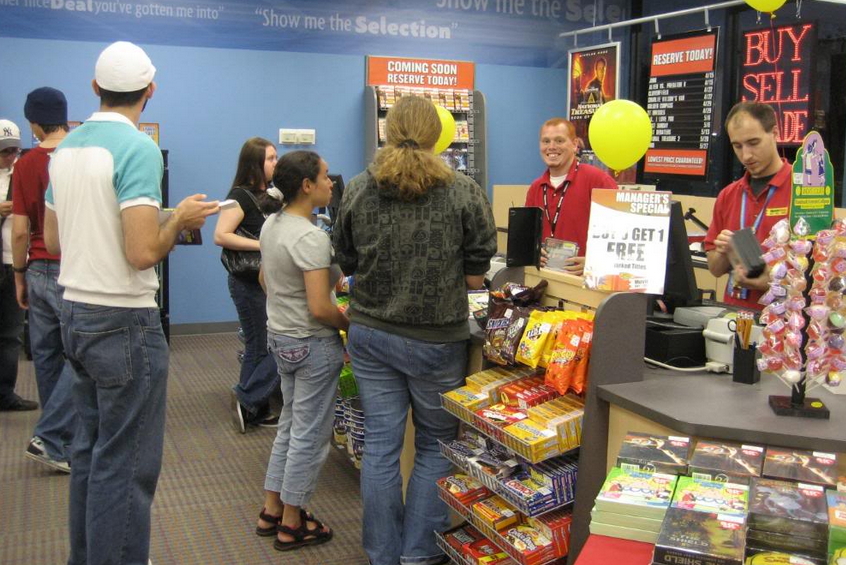
ARE LONG QUEUES A PROBLEM? OPEN NEW REGISTERS CHEAPLY

POS SOFTWARE


Cash Registers point of sale

MANY CUSTOMERS WILL NOT WAIT.
What they do is they walk out and abandon their purchases.


Have you ever seen this? Your store is bustling when you spot a potential customer walking away, discouraged by the long wait. Does this strike a chord? It's a common challenge. Statistics show that 70% of shoppers will walk out if faced with a long queue. This is a severe issue in retail that needs urgent thought the waiting time in queues. I once witnessed a boutique lose a $500 sale because a customer in the queue put the dress down and walked out, as she probably couldn't endure the wait in line. This is the problem with a long line.

Here's the good news: Our POS system makes opening new registers straightforward without breaking the bank.  

Multiple Tills on One Computer: Streamlining Retail Operations

Our advanced point-of-sale system for small businesses allows you to set up numerous tills on a single computer. This means:

  1. No need for expensive new hardware: Use your existing system more efficiently with the new technology.
  2. More cashiers: You can have more registers with more cashiers on the counter.
  3. Quick setup: Open a new till in minutes, not days.
  4. Flexible configuration: Adapt to busy periods by opening extra tills as needed to improve customer service.

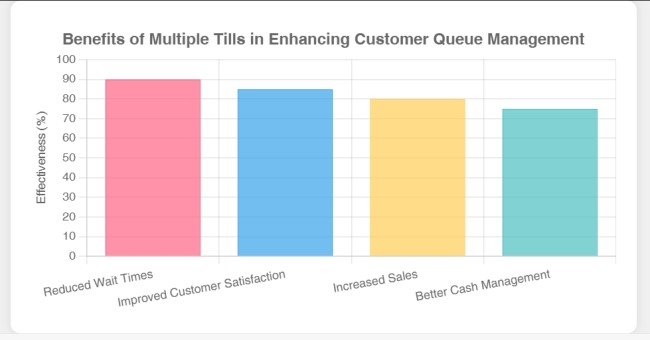
The Benefits of Multiple Tills: Enhancing Customer Queue Management

One of our users told me, "It's like we've expanded our shop without actually expanding!"

How to Get Started with Your New POS System

Contact us and we can start immediately.

Elevating Customer Experience and Streamlining Sales

Throughout my extensive career working with point-of-sale systems for small enterprises, I've observed how minor adjustments can significantly impact retail operations. This multi-till approach stands out as a true innovator. It offers an intelligent, economical method to enhance customer service, drive revenue growth, and simplify your team's daily tasks.

Add new comment

Restricted HTML

  • Allowed HTML tags: <a href hreflang> <em> <strong> <cite> <blockquote cite> <code> <ul type> <ol start type> <li> <dl> <dt> <dd> <h2 id> <h3 id> <h4 id> <h5 id> <h6 id>
  • Lines and paragraphs break automatically.
  • Web page addresses and email addresses turn into links automatically.
CAPTCHA This question is for testing whether or not you are a human visitor and to prevent automated spam submissions. Image CAPTCHA
Enter the characters shown in the image.

How to create a register shortcut key

POS SOFTWARE

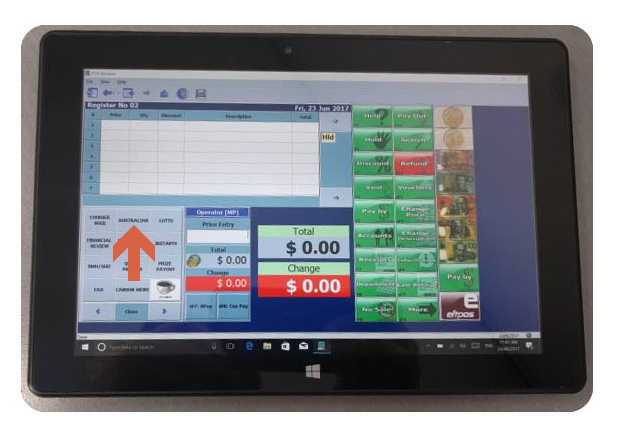
Say you have a spare spot (See the orange button above) and you want to set up a register shortcut key for a department so you can press a button to quickly process a department sale. It is even faster with touch but that is another point.

Well, it is easy and quick to do.  

1.       From the Main Menu, go to Cash Register and then Register Setup.

2.       Click on the Quick Links tab.

3.       On the layout on the left, click where you want the shortcut to go. You should see the green plus symbol on that square now.

4.       In the department list on the right, click the department you wish to add to that location.

5.       Click on the Insert at Location button.

6.       Click the Save button.

Now the changes should be there.

Add new comment

Restricted HTML

  • Allowed HTML tags: <a href hreflang> <em> <strong> <cite> <blockquote cite> <code> <ul type> <ol start type> <li> <dl> <dt> <dd> <h2 id> <h3 id> <h4 id> <h5 id> <h6 id>
  • Lines and paragraphs break automatically.
  • Web page addresses and email addresses turn into links automatically.
CAPTCHA This question is for testing whether or not you are a human visitor and to prevent automated spam submissions. Image CAPTCHA
Enter the characters shown in the image.

Cash register look

POS SOFTWARE

This is our cash register. If you look at the screen, not the girl, it is from a publicity shot that we did what you will see is buttons all over the screen. Also, every one of them is user-definable. What this means is that you can change them, or move them to match exactly what you want it to look like.


Add new comment

Restricted HTML

  • Allowed HTML tags: <a href hreflang> <em> <strong> <cite> <blockquote cite> <code> <ul type> <ol start type> <li> <dl> <dt> <dd> <h2 id> <h3 id> <h4 id> <h5 id> <h6 id>
  • Lines and paragraphs break automatically.
  • Web page addresses and email addresses turn into links automatically.
CAPTCHA This question is for testing whether or not you are a human visitor and to prevent automated spam submissions. Image CAPTCHA
Enter the characters shown in the image.

Zip Intergration with PosBrowser

POS SOFTWARE

PosBrowser has launched a new facility for you and your clients. We now offer a Zip Pay payment type directly built into the PosBrowser register.  This week we were joined by Andreas Collier from Zip pay to discuss and demonstrate how easy it is to setup and use as well as answering a bunch of question you may be interested in hearing. 
Watch the video and see what you think. 
Also as a special offer to PosBrowser user, Andreas will personally handle the process of getting your ZIP PAY account activated and the details you will need for integrating ZIP with PosBrowser.   Just contact him via email [email protected] 

If you find this video helpful or you have any question please reply in the comments. Also check out our blog often to see what the next webinar is going to cover in our weekly sessions or make a suggestion for a topic you'd like to hear more about. 


Add new comment

Restricted HTML

  • Allowed HTML tags: <a href hreflang> <em> <strong> <cite> <blockquote cite> <code> <ul type> <ol start type> <li> <dl> <dt> <dd> <h2 id> <h3 id> <h4 id> <h5 id> <h6 id>
  • Lines and paragraphs break automatically.
  • Web page addresses and email addresses turn into links automatically.
CAPTCHA This question is for testing whether or not you are a human visitor and to prevent automated spam submissions. Image CAPTCHA
Enter the characters shown in the image.